Useful tools for finding weaknesses, and the hardening that closes them
Nathan Chadwick · · 40 min read
Listen
TLDRRead the short version
- PingCastle scores a domain in minutes. The number is the worst of four categories, not an average. BloodHound then shows the path that score is pointing at.
- Nmap, NetExec, Wireshark and Impacket are how you see the internal network. Greenbone is the free scanner you can point at a server VLAN. Nessus Essentials is 5 IPs with a 30-day-old plugin feed. Qualys Community Edition is a small cloud entitlement.
- Burp Community and ZAP test web apps you own. sqlmap stops at proof a parameter is injectable. Hashcat and John measure an authorised password audit. They are not a cracking guide.
- Atomic Red Team checks one technique. Caldera checks whether a chain is visible. Shodan shows what the internet already can. Autoruns, Sigcheck, Process Explorer, TCPView and Sysmon are the Windows visibility set.
- HardeningKitty, Policy Analyzer, CIS-CAT Lite and Attack Surface Analyzer score a build. The controls that make the next scan boring are patching within 14 days, unique admin passwords, phishing-resistant MFA, and closing LLMNR, NTLMv1, SMBv1 and workstation-to-workstation traffic.
On this page
- What these tools are for
- Active Directory
- Network discovery and internal testing
- Vulnerability scanning
- Web applications
- Passwords and credentials
- Testing whether the EDR works
- External attack surface
- Persistence, integrity and visibility
- Configuration baselines
- Hardening every operating system
- Windows credentials and identity
- Windows attack surface
- Linux
- macOS
- Network controls that protect hosts
- Where to start
- References

What these tools are for#
The tools and the hardening are the same job, seen from each end. One shows you a path. The other removes it.
This is the set I reach for when I want to know whether an estate is as closed as the policy says. Active Directory first, because that is where a short path to privileged access hides. Then the internal network, the missing patches, the web applications, the passwords, the question of whether the endpoint detection and response (EDR) notices anything, what the internet can already see, and what a Windows host is set to start. After that, the baselines that score a build, and the controls I want on every operating system so the next run of those tools is boring.
Two rules cover the whole list.
These tools are for systems you are responsible for, or systems you have written permission to test. Several of them are the same tools that show up in incident reports. I wrote about that overlap in the grey zone post. Tell the person who watches the alerts before you run a collector, a scanner, or a detection test. A SharpHound run nobody expected is an incident. A SharpHound run you booked is a health check. The telemetry is identical.
The figures in this post are illustrative. I drew them for the article, against a fictional domain called northlab.local. They are not vendor screenshots, and they are not anyone’s real results. They are there so you can recognise the tool when you open it.
Free tiers move. Where a limit matters, I have used the vendor’s current published terms and linked them. Check the page before you plan a rollout around a number.
Active Directory#
If you only run two things against a Windows domain, run these. PingCastle tells you the domain is unhealthy, and which category hurts. BloodHound tells you the path a person would actually walk.
PingCastle#
PingCastle, now published by Netwrix, is a health check for Active Directory and for Entra ID. You point it at a domain you administer and it writes a report in minutes. The design aim is deliberate: find most of the serious issues without a week-long assessment.
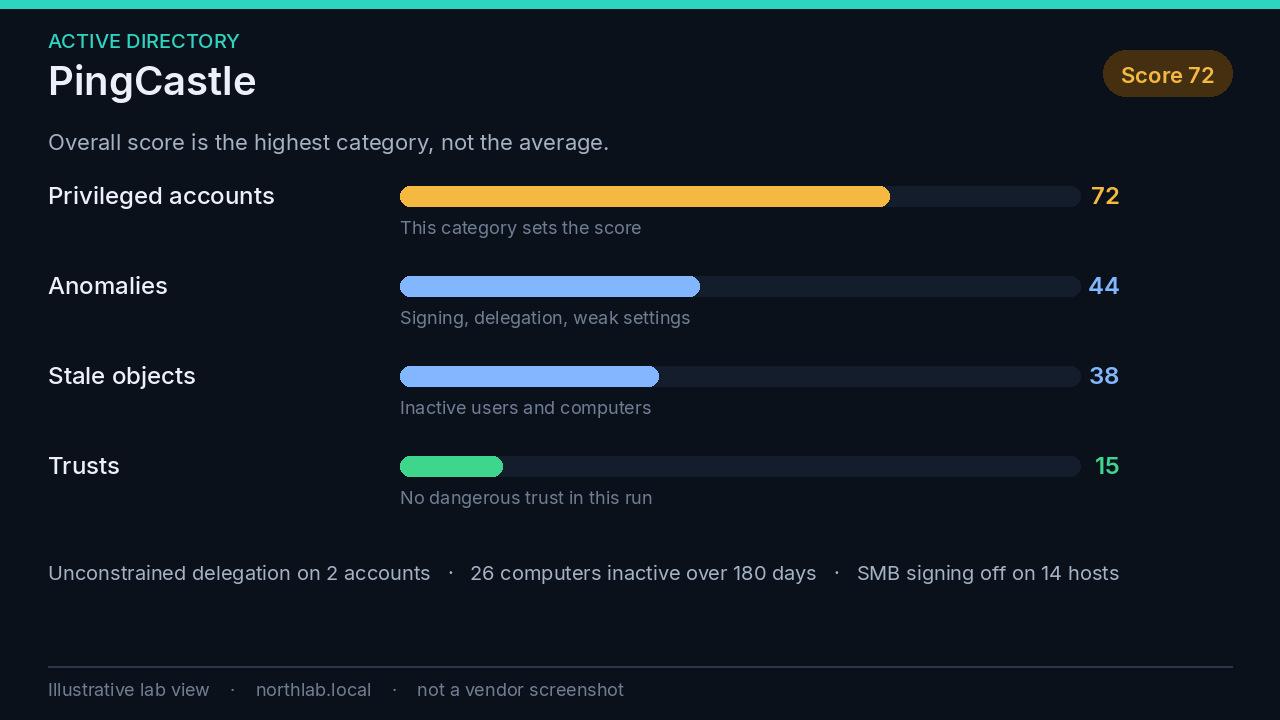
The score is the part people misread. There are four categories, each capped at 100: privileged accounts, trusts, stale objects, and anomalies. The overall score is the highest of the four, not the average. A domain that scores 20, 20, 20 and 80 is an 80. Fix the category that sets the number before you chase a tidy report.
Each rule has points, a reason, and a suggested fix. The rules worth reading on a first run are the ones that become attack paths later: unconstrained Kerberos delegation, inactive computers and users, old trust protocols, and SMB signing left off. The report explains the rule in the report. You do not need a second tool to understand the first page.
The community edition is free for internal use. That includes a company’s own staff, and a contracted provider assessing that company’s directory. Selling PingCastle assessments needs a commercial licence. Each build runs until the end-of-support date baked into it, then it stops, so updating the release is part of using it. There is also a trust map and an Entra ID score. Start with the domain health check. It does not drop a collector onto every workstation, which is why it comes before BloodHound.
BloodHound#
BloodHound answers a different question: who can become a privileged principal, and through which relationships, including the ones nobody documented. It is graph theory applied to identity. Group membership, local admin rights, sessions, and control rights on objects become edges. A path is a chain of those edges.
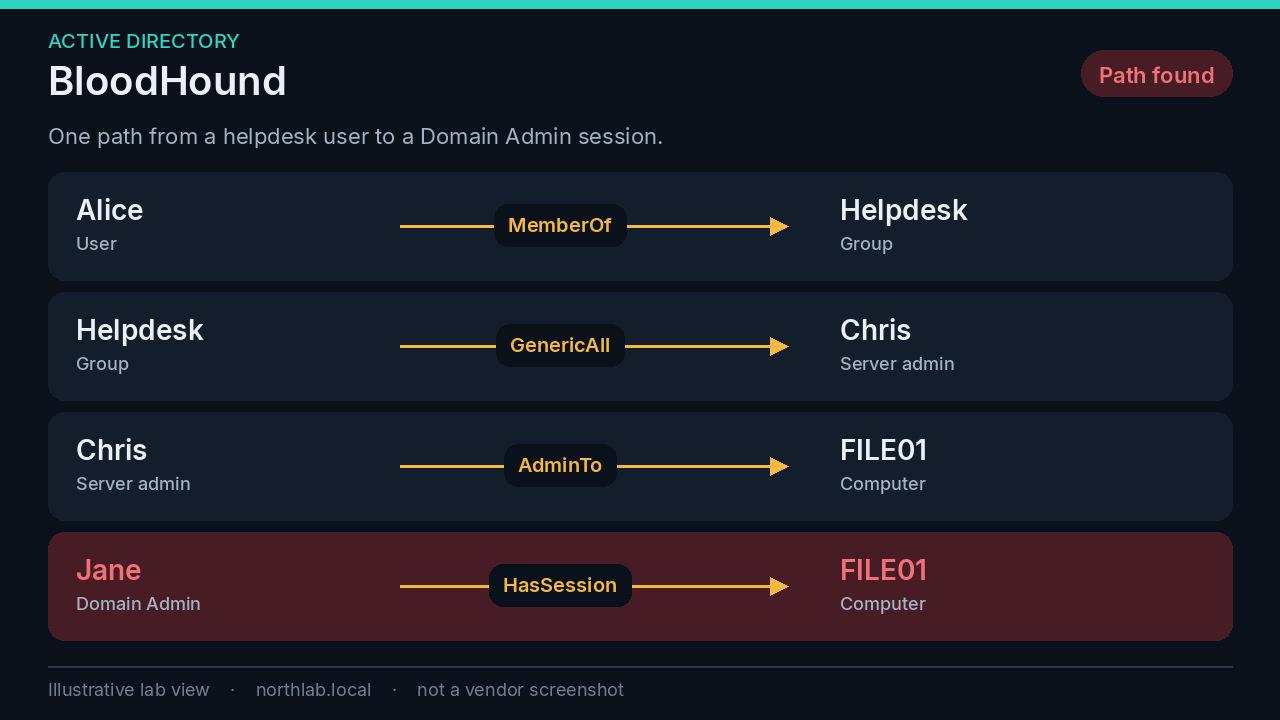
The current free product is BloodHound Community Edition, maintained by SpecterOps. SharpHound collects Active Directory: groups, trusts, abusable rights, Group Policy links, the OU tree, local administrators, and sessions. AzureHound collects Entra ID and Azure. PostgreSQL is the recommended database now. Neo4j still works. OpenGraph is how the model reaches past those two directories. There is sample data, and it is the right way to learn the interface before you point a collector at production.
Read the edges as plain language. MemberOf is membership. GenericAll on a user is control of that user. AdminTo is local admin on a computer. HasSession means that account’s credentials are present on that machine because someone logged on. In the figure, Helpdesk can take Chris, Chris administers a file server, and a Domain Admin has a session there. A group review will never show you that chain. Closing it means taking the control right away, or stopping privileged accounts from logging on to servers where ordinary admins work. Often both.
Sessions change through the day. One collection understates where privileged people log on, so a serious look repeats session collection across a working day. Do that in a window the security operations centre (SOC) already knows about. Endpoint products flag SharpHound on purpose. BloodHound’s own documentation says so. Community Edition is the free tool you run deliberately, from a machine you named in the change. BloodHound Enterprise is the product built for defenders who want a collector the EDR already trusts, running continuously.
Network discovery and internal testing#
This is how you see your own network the way an internal test would. Ranges you are responsible for, or ranges written into a permission. A lab virtual machine or a named admin host, not the laptop you also read email on. Nmap finds hosts and services. NetExec tells you how those Windows services are configured, and where a credential is accepted. Wireshark shows what the packets are actually doing. Impacket is the library behind a large share of the tooling in real incidents, which is why defenders have to recognise it.
Nmap#
Nmap is the network mapper. Host discovery, port scans, service and version detection, and the Nmap Scripting Engine. For a defensive inventory the useful question is simple: what is listening, on which host, and what software answered.
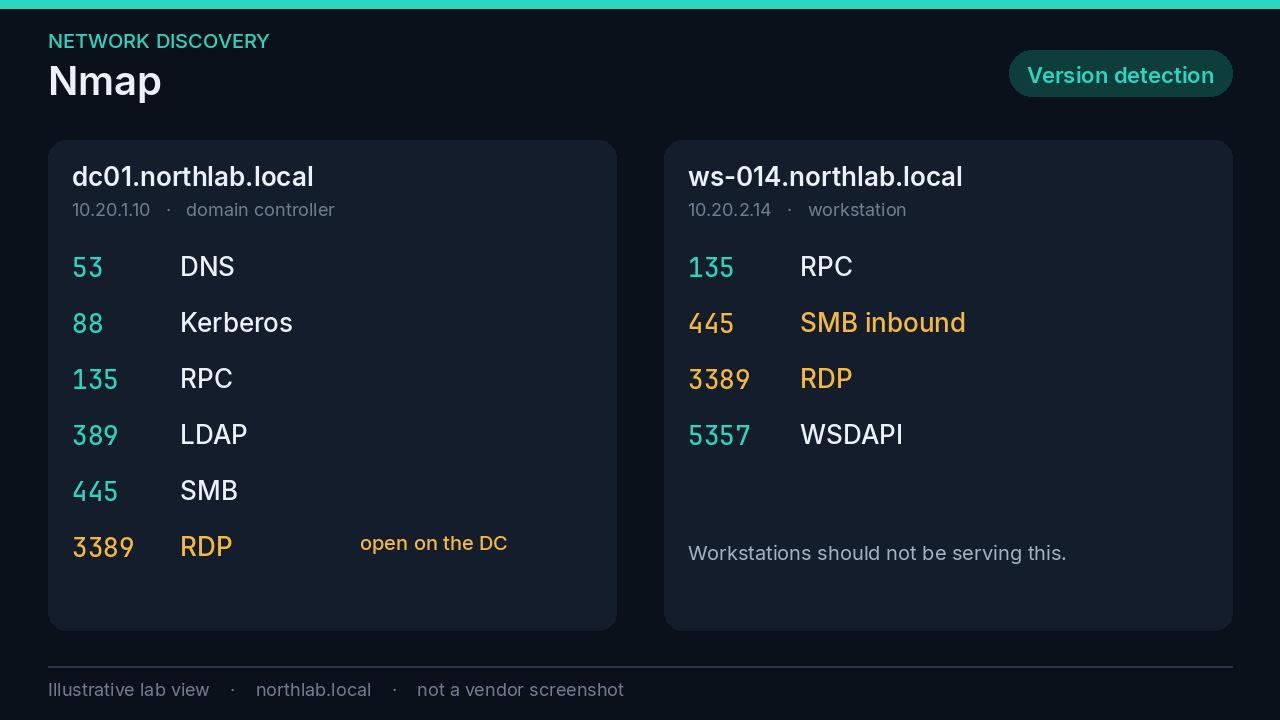
Version detection on ranges you own is enough for a first pass. The scripting engine includes intrusive scripts. Leave those alone unless the test plan names them. What you want from the output is a list you can argue with: RDP listening on a domain controller, SMB listening on a workstation, an old web server on a port nobody documented. That list becomes firewall rules and the “remove what you do not use” control later in this post.
Keep the scan inside ranges you own. A sweep of the public internet is someone else’s inventory.
NetExec#
NetExec is the maintained successor to CrackMapExec. It speaks the protocols an internal test lives in: SMB, LDAP, WinRM, RDP, MSSQL, SSH, WMI and others. The first use, and the one that belongs in an ordinary health check, is enumeration. Which hosts require SMB signing. Which still speak SMBv1. What operating system answered.
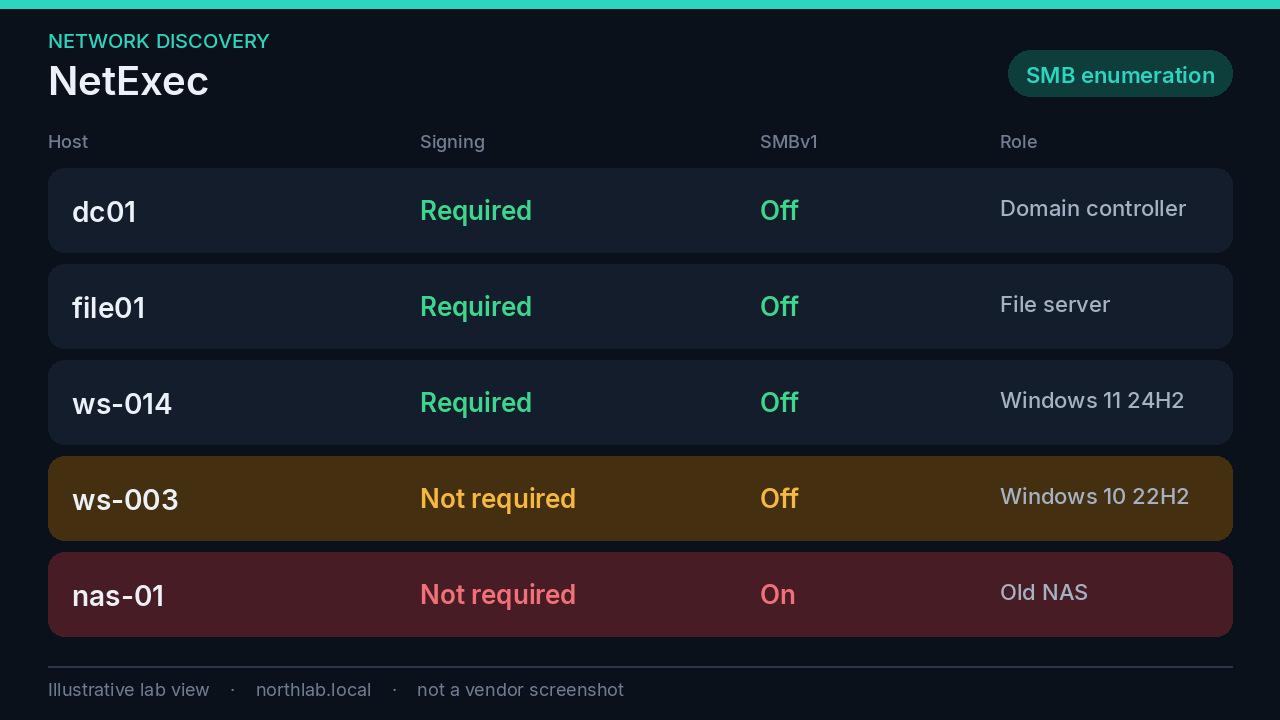
The second use is authenticated: where does this credential work. That is the pass-the-hash question from the LAPS post. A shared local admin password turns one compromised workstation into every machine that shares it, and NetExec is one of the tools that makes the trial cheap. Alert on the binary. A single password on forty machines is already the finding. If your EDR flags NetExec on a host outside a booked test, treat it as hostile until someone owns it.
Wireshark#
Wireshark is a packet analyser. It is how you check that a control you think you deployed is actually what the network is doing. Display filters earn their place here: llmnr, nbns, dns, smb, rdp.
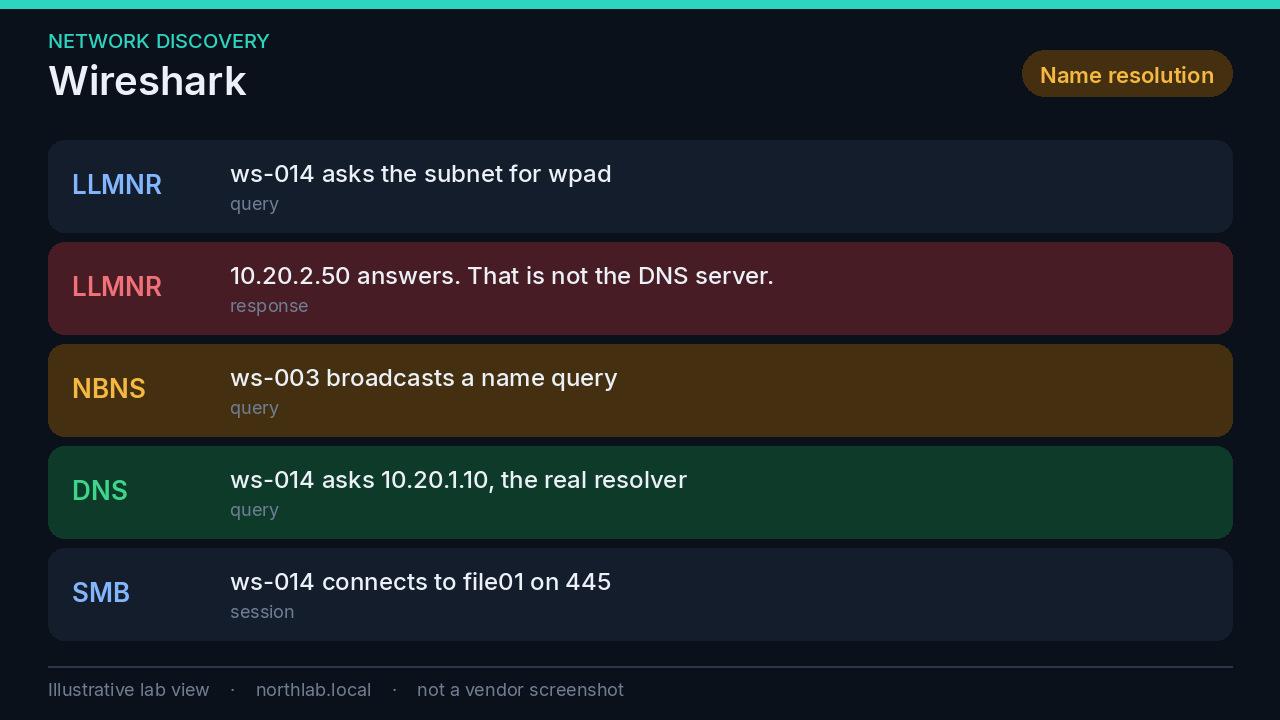
Link-Local Multicast Name Resolution (LLMNR) and NetBIOS Name Service (NBT-NS) are fallbacks. A host fails a DNS lookup and asks the local subnet. Any host on that subnet can answer. The usual tool on the answering end is Responder, and the thing it collects is a NetNTLMv2 challenge-response: a password-equivalent that can be relayed or cracked. The figure is the before picture. After you turn the protocols off, the same capture should show no stranger answering. That capture is the test that the hardening worked.
The same habit catches cleartext. FTP, Telnet, and HTTP basic authentication are still out there, usually on an appliance nobody wants to touch. A five-minute capture on the server VLAN is worth more than another policy paragraph.
Impacket#
Impacket is Fortra’s Python implementation of Windows network protocols. The library is legitimate. The examples directory is why it dominates incident reports. The names to recognise are secretsdump, GetUserSPNs, GetNPUsers, ntlmrelayx, wmiexec, psexec, smbexec and ticketer.
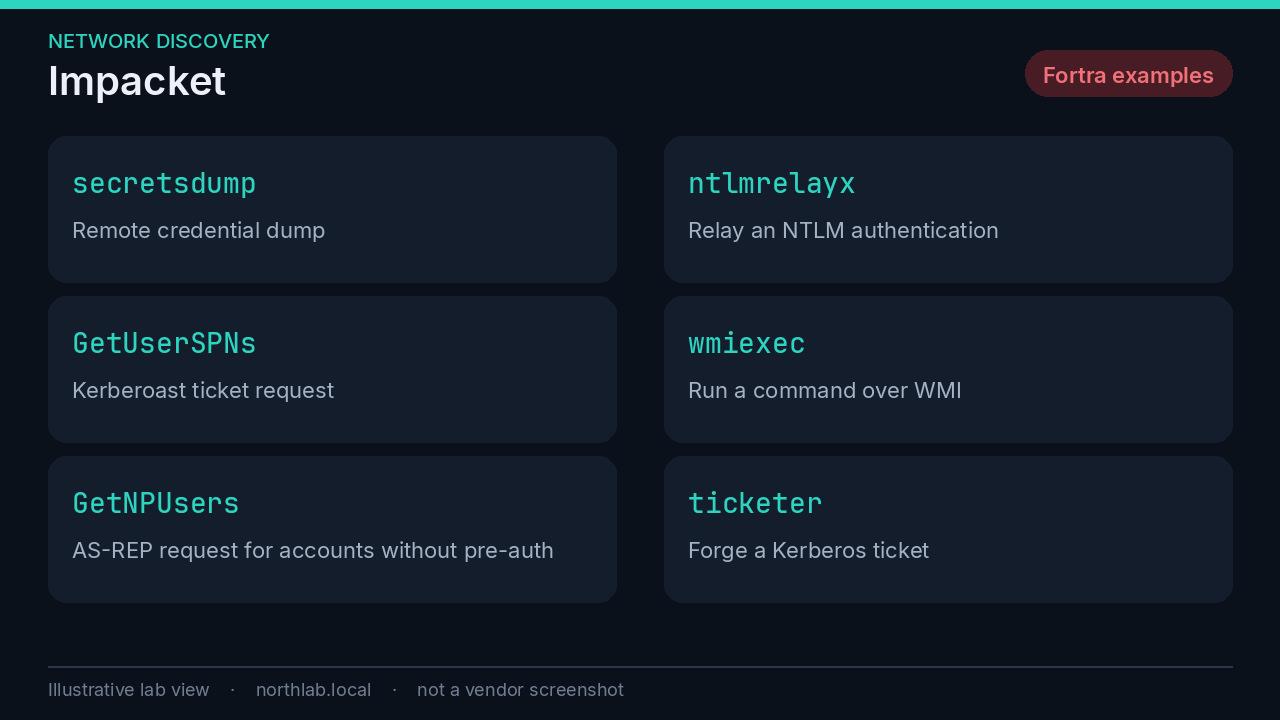
In plain language: dump credentials from a host you can authenticate to, request Kerberos tickets for cracking, relay NTLM, run a command remotely, or forge a ticket. The Sophos Active Adversary Report put Impacket in 36% of observed tooling. I covered why that number matters in the grey zone post: the activity is valid protocols and, often, a valid account. Nothing about the packet says malware.
Alert on those names in process command lines and in Sysmon. Then remember the exception you created yourself. A penetration test you booked produces the same strings. The difference is whether the SOC was expecting them. That is a judgement, which is why the log has to exist.
Vulnerability scanning#
A vulnerability scanner answers a narrower question than the tools above. Which known vulnerabilities exist on these hosts, given the feed I have today. It does not find a bad ACL. It does not find a shared password. It finds missing patches, old protocols, and default services, and only as well as its feed and its credentials allow.
Authenticated scans are the ones that matter on Windows. An unauthenticated pass sees the network view. The missing cumulative update is on the other side of a login.
| Tool | What you pay | The practical limit | Use it for |
|---|---|---|---|
| Greenbone Community Edition (OpenVAS) | Free | Your hardware. The community feed has no enterprise update commitment. | Authenticated scans of the servers you run. |
| Nessus Essentials | Free, non-commercial | 5 IPs. Plugin updates delayed 30 days. Reporting disabled. | A lab, and learning Nessus. |
| Qualys Community Edition | Free | A small fixed cloud entitlement. Confirm it in the portal. | A first look at the outside, plus a handful of internal assets. |
OpenVAS and Greenbone#
People still search for OpenVAS. The scanner engine kept the name. The product you install is Greenbone Community Edition, and the vulnerability tests come from the Greenbone Community Feed.
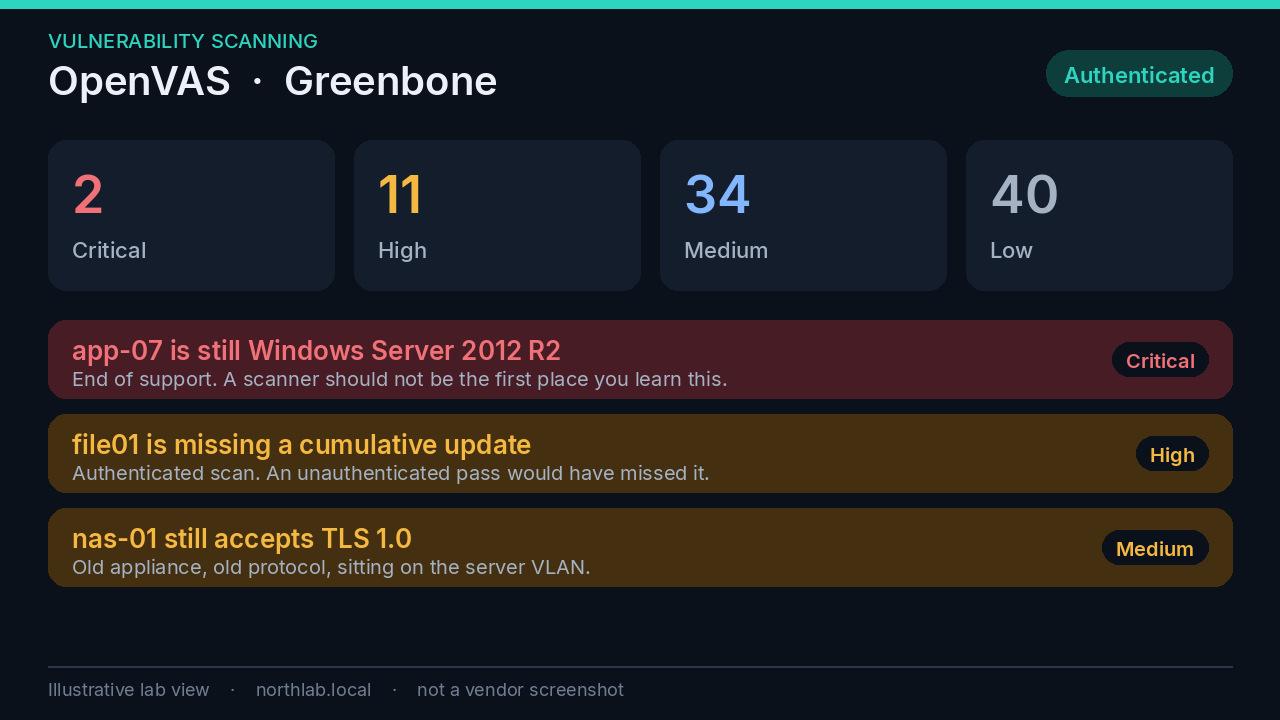
The community feed is updated regularly and without the enterprise feed’s daily commitment, so it can lag, and it can stall. That is an acceptable trade for a free scanner you operate yourself. It is a poor trade if you are using the feed as your only source for vulnerabilities published this week. The first synchronisation is large. Give it time and disk before you decide the install is broken.
Point it at assets you own. Prefer authenticated checks for Windows and Linux. Keep a ticket for every critical and high that survives a week. A scanner nobody reads is a PDF generator. An end-of-life operating system in the results is not a scanner finding so much as a failure of inventory. Cyber Essentials will fail that one outright, which I covered in the requirements walkthrough.
Nessus Essentials#
Nessus is still the scanner a lot of people learn on. Tenable’s current free tier, Nessus Essentials, scans up to 5 IP addresses, for non-commercial educational use. Plugin updates are delayed by 30 days, and reporting features are disabled. There is a paid Essentials Plus step for a larger lab, still non-commercial, with current plugins. Nessus Professional is the commercial scanner, without the five-address cap.
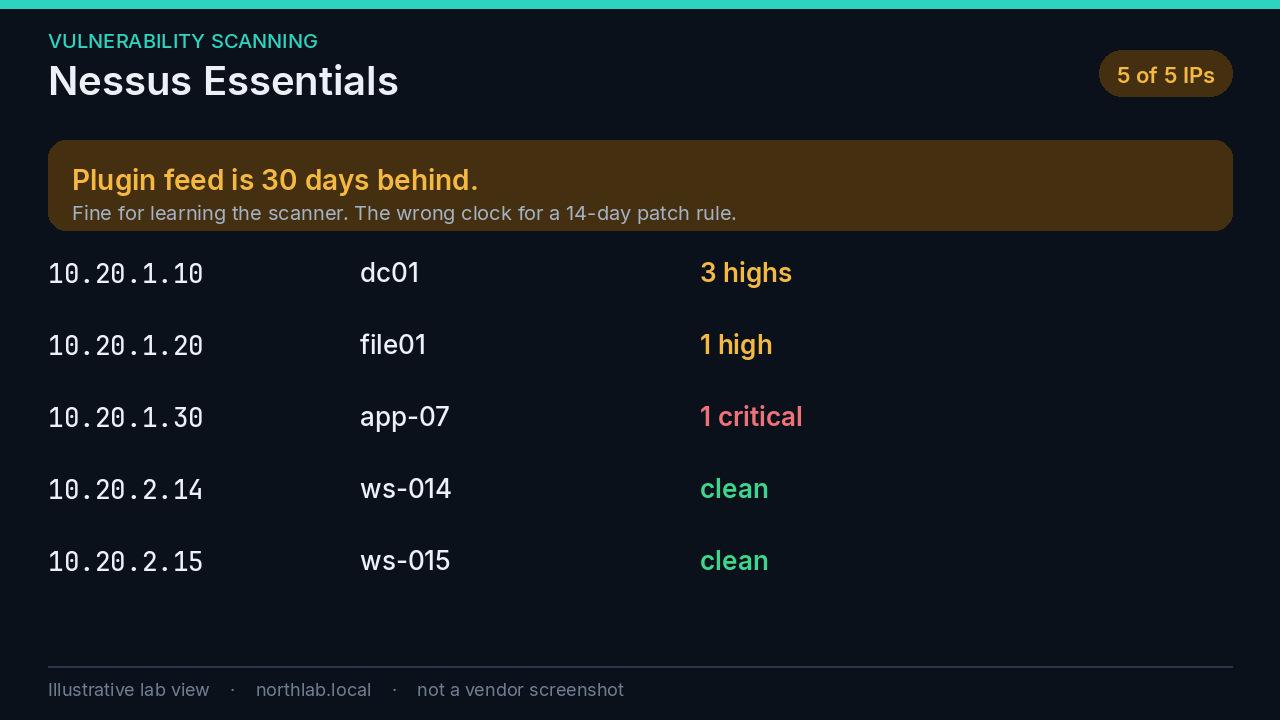
I would not put a production estate on Essentials and call it vulnerability management. A feed that is a month behind will miss the vulnerability you are supposed to patch inside 14 days. Use it to learn the plugin model, or to scan a lab. When the estate is real, use a scanner whose feed is current and whose licence covers the address count. The discipline is the same on any of them: authenticated, scheduled, and owned.
Qualys Community Edition#
Qualys Community Edition is the free cloud offering. The getting started guide describes an entitlement of 16 internal IPs, 3 external IPs, one web application URL, 16 Cloud Agents and one virtual scanner. The live portal is the source of truth for the account you were actually given. Free tiers get revised without the blog posts catching up.
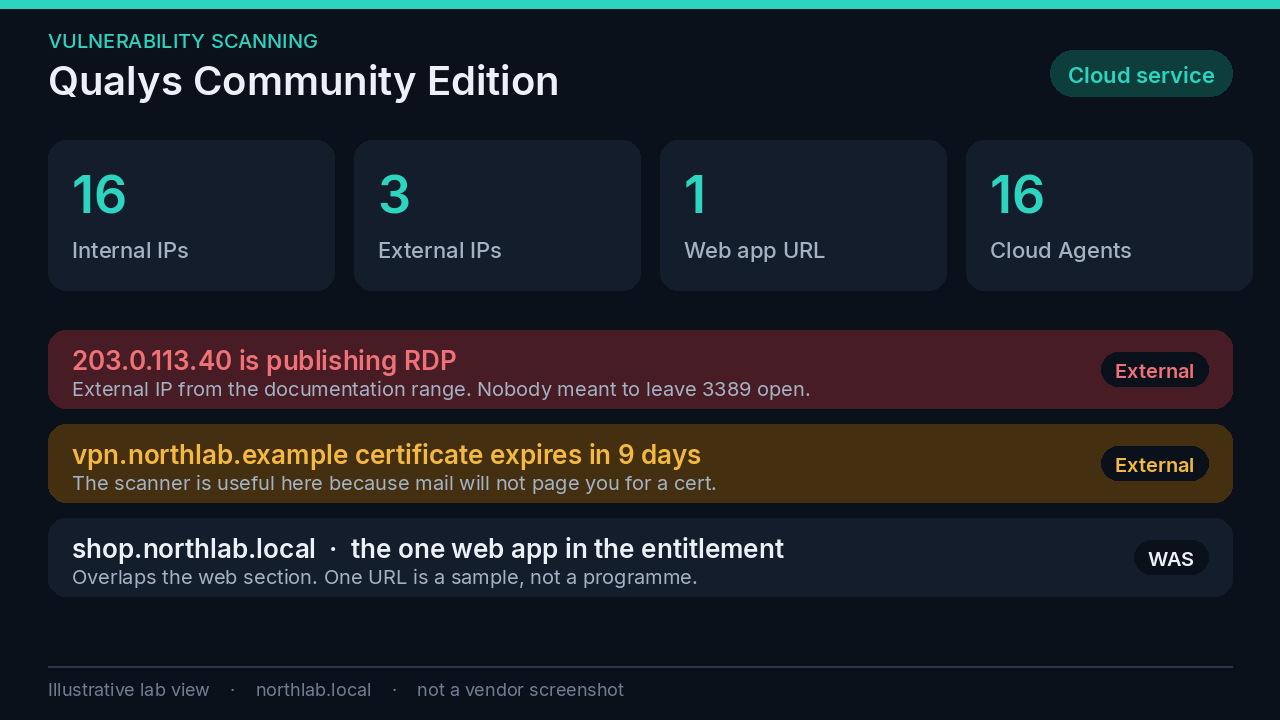
It is a cloud service, so scan data leaves your building. For many organisations that is fine and is the point, because the external view is the thing an on-premises scanner does not give you for free. For some it is a procurement question. Answer it before you enrol production hosts.
Three external addresses will not cover a large perimeter. They will cover the ones you are most worried about, which is often enough to find the RDP service nobody meant to publish. The single web-application URL overlaps the next section. Treat it as a sample of the platform, and use ZAP or Burp when you have more than one application to care about.
Web applications#
Network scanners do not test whether user A can read user B’s orders. That is a web-application test, done against an application you own, in a non-production environment whenever you can arrange one. Active scanners submit forms and send unexpected input. Point them at checkout in production and you will learn what a noisy test does to a real order queue.
Burp Suite#
Burp Suite Community Edition, from PortSwigger, is the manual toolkit. An intercepting proxy, Repeater, Decoder, Comparer, and a throttled Intruder. The automated scanner is Burp Suite Professional.
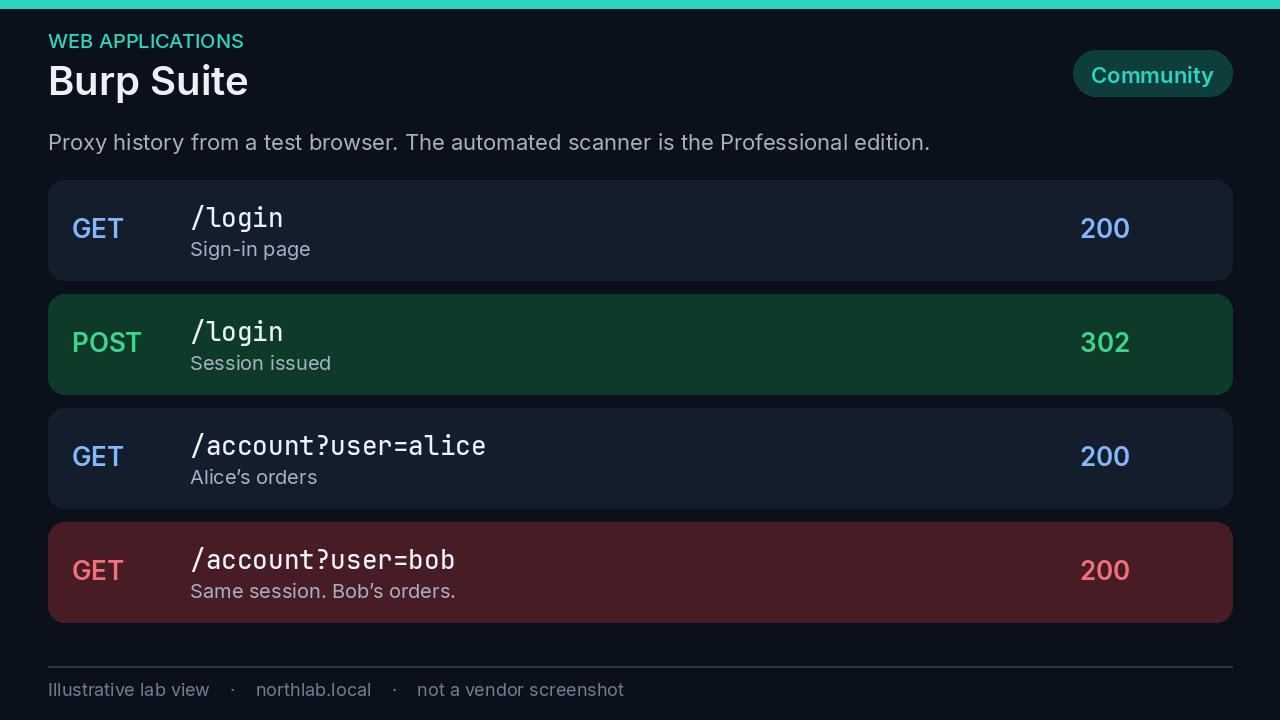
Install the Burp certificate only in a browser profile you use for testing. The workflow is ordinary and still the most productive hour you can spend on an internal app: browse as a real user, look at the requests, change an identifier, and see whether the server checks who you are. The figure is that test. Alice’s session asked for Bob’s orders and the server said yes. No payload required. Community Edition is enough for this. Professional is what you buy when you want breadth across a lot of applications and you are tired of doing the repetitive checks by hand.
OWASP ZAP#
OWASP ZAP is the free intercepting proxy that also scans. Spider the application, browse it yourself so the passive scanner sees real traffic, and run an active scan when you are ready to accept the noise. Alerts are grouped by risk. A reflected cross-site scripting finding and a session cookie without the Secure flag are the sort of thing it is good at.
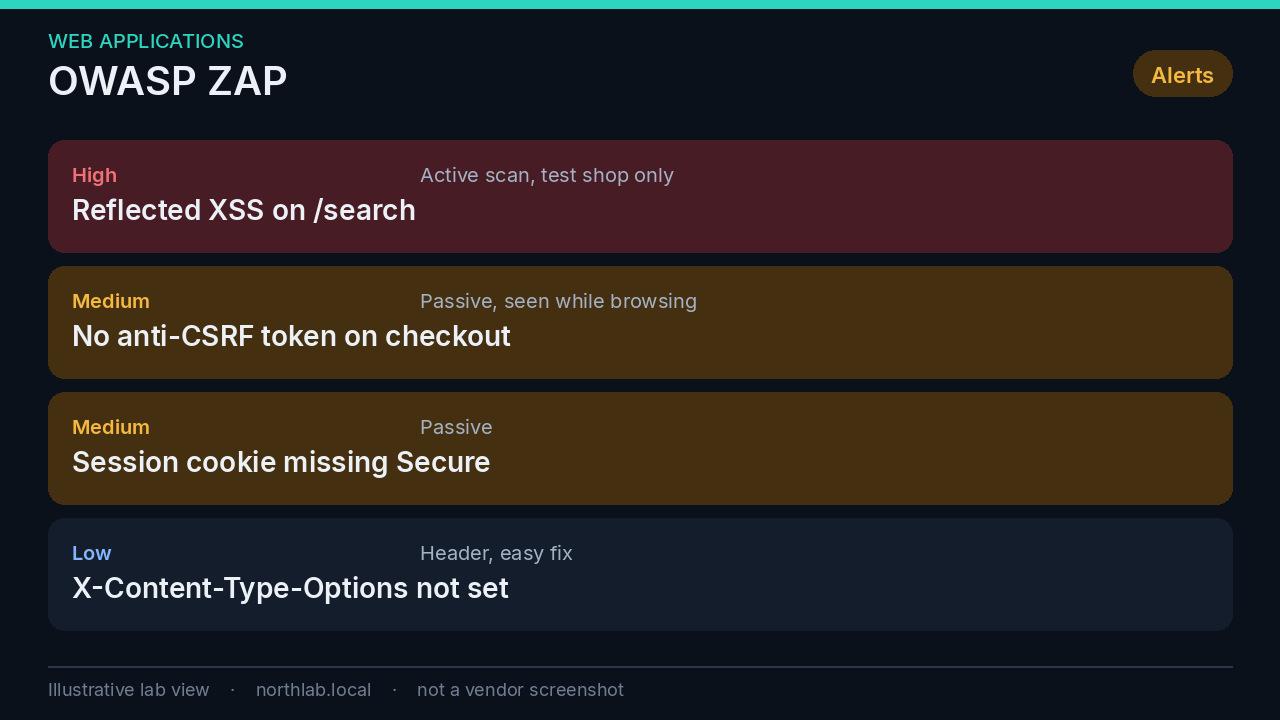
ZAP is the default I would give someone who does not have Burp Professional and needs more than a manual hour. The active scan is the part to contain. It will fuzz parameters and submit forms. Run it against a test environment, with a test account, and read the report against the OWASP Top 10 rather than treating every informational item as a project.
sqlmap#
sqlmap tests whether a parameter you point it at is vulnerable to SQL injection. Used on an application you own, in a test environment, the result you want is a yes or a no, and the class of injection. Then you stop.
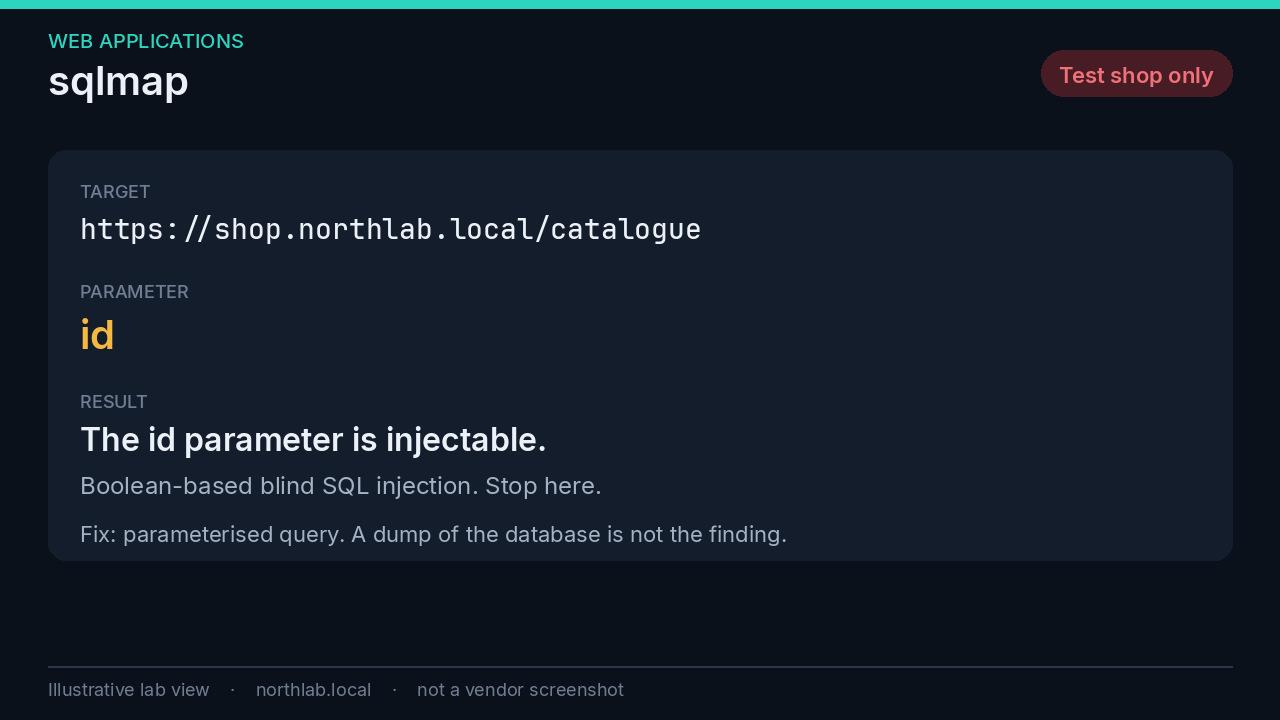
The fix is a parameterised query, which the OWASP SQL injection cheat sheet has said for years. The result you keep is the proof that the parameter is injectable. Dumping tables needs written permission and a reason you can defend to the data owner. A vendor who wants the tool pointed at production gets a test environment and a written scope.
Passwords and credentials#
An offline password audit answers one question: of the password hashes we are allowed to hold, how many fall to a wordlist and to light rules, and what pattern do they share. The count is the finding. The pattern is what you take back to the policy. Season plus year, the company name, a keyboard walk.
You need to be allowed to hold the hashes. A domain audit you were asked to run, a lab, or a set of test hashes. Hashes you happened to find are not a project.
hashcat#
hashcat is the GPU password auditor. It covers the hash types you meet in a Windows environment: NTLM, NetNTLMv2, and the Kerberos tickets that come out of Kerberoasting and AS-REP roasting. You give it a hash type, a wordlist, and optionally rules. It reports what it recovered and then it exhausts the queue.
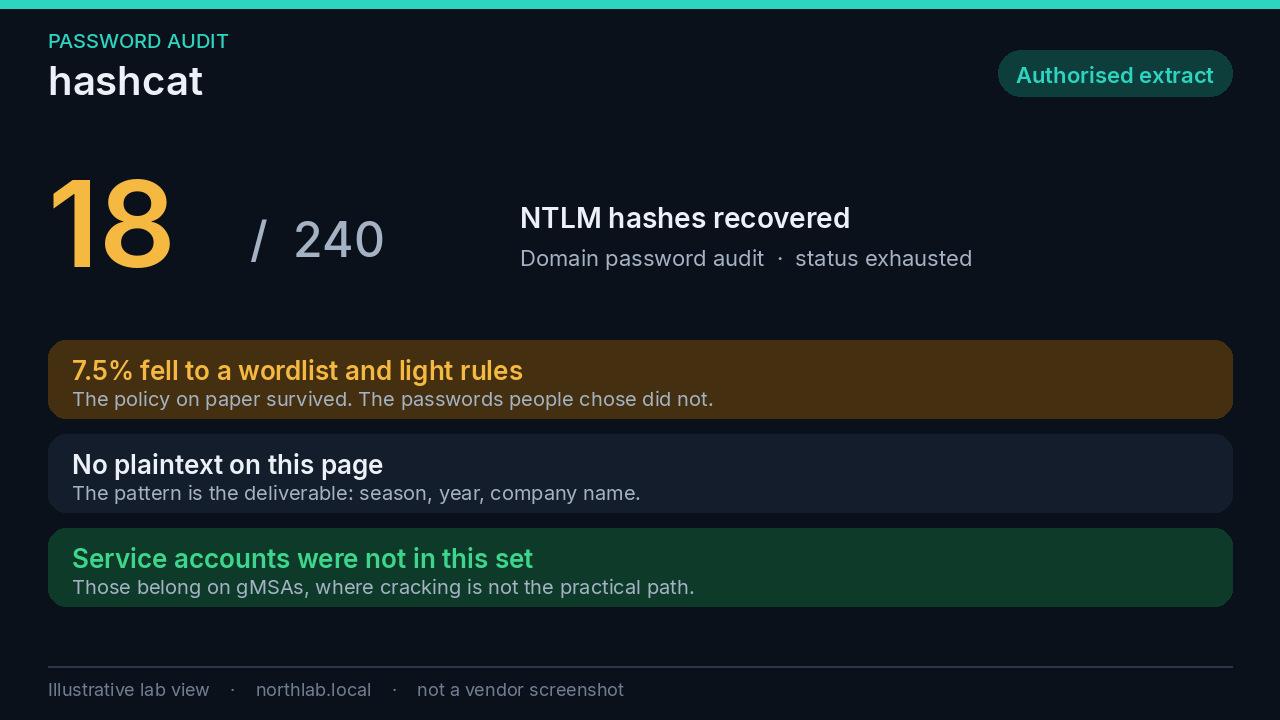
The decision sits in the count. If a meaningful share of the domain falls to a common wordlist, the policy is theatre. Entra Password Protection and a banned-password list on the domain close the pattern. Service accounts do not belong in this set at all. A group Managed Service Account has a long random password the directory rotates. Cracking it is not the practical path, which is why the Kerberos section below prefers them.
John the Ripper#
John the Ripper, particularly the jumbo build, is the CPU counterpart. It covers a long tail of formats, and it runs on a machine with no GPU. The question it answers is the same question hashcat answers.
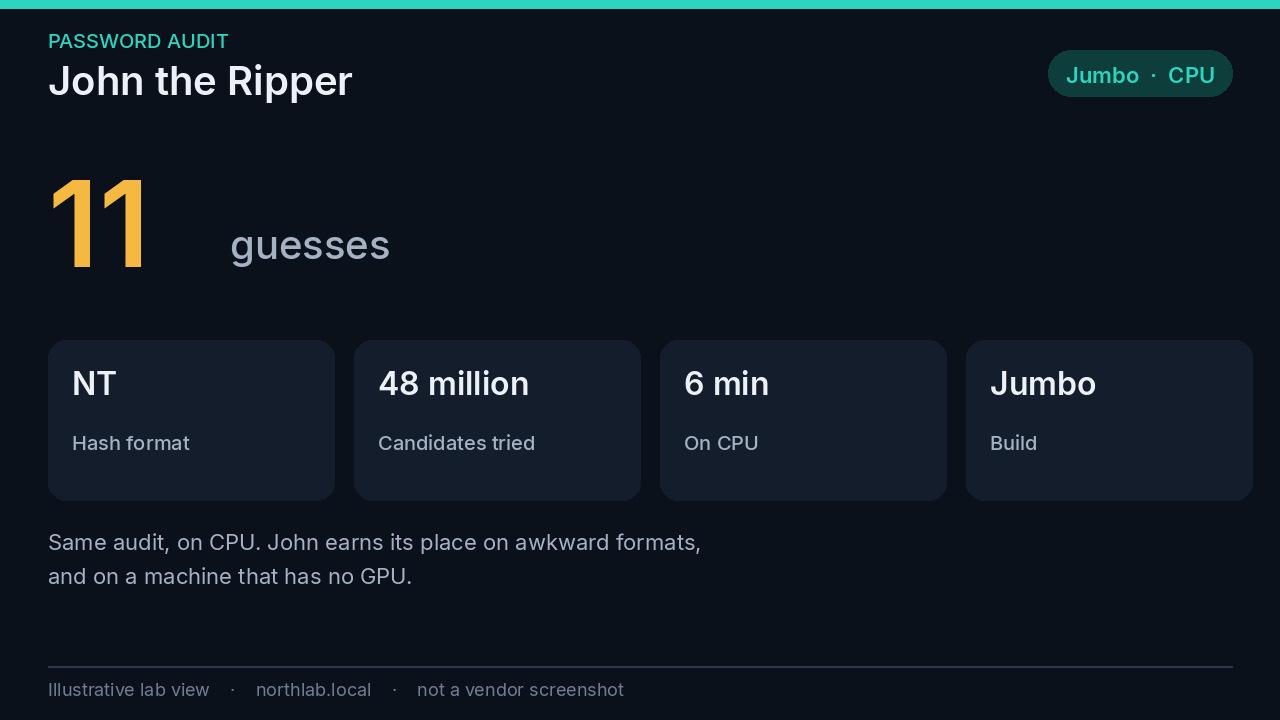
Pick one as the primary tool and keep the other for the formats it handles better. Publish the count and the pattern to the people who own the password policy. Do not publish the passwords. A list of recovered passwords in a ticket is a second credential store you did not mean to create.
Testing whether the EDR works#
An EDR with tamper protection, reporting to a console somebody opens, is one of the universal controls further down. This section is how you find out whether that sentence is true. Pick techniques you claim to detect. Run them on a pilot host that is checking in. Compare what you expected with what arrived, and with whether a person saw it.
Tell the SOC before you start. Otherwise every alert is a false incident, and the one time you need them to believe an alert, they will remember this.
Atomic Red Team#
Atomic Red Team, from Red Canary, is a library of small tests mapped to MITRE ATT&CK techniques. Invoke-AtomicRedTeam runs one test and can run its cleanup. It works on Windows, and on macOS and Linux if PowerShell is there. Each test is a procedure for one technique, with a description you are supposed to read first.
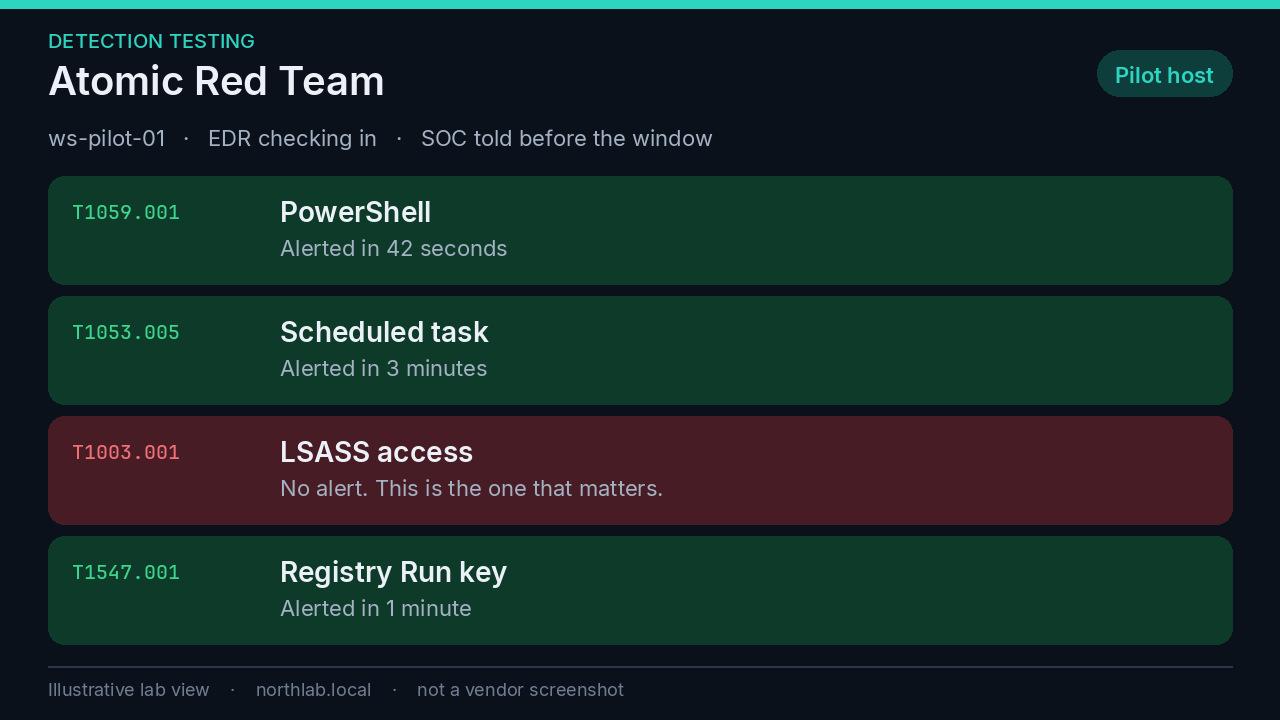
The workflow is short. Choose a technique your product claims to cover. Read the test. Some of them are disruptive, and you are responsible for the state of the machine afterwards. Run it on a pilot that matches production closely enough to be honest. Write down whether an alert fired, how long it took, whether the severity was right, and whether a person was watching. Run the cleanup.
A missed T1003 test, credential access against LSASS, should spoil your afternoon. That is the step between a foothold and the credential theft the rest of this post is trying to make useless. A product that alerts on a noisy PowerShell one-liner and stays quiet when a process opens LSASS has its priorities backwards. Fix the detection, or change the claim.
MITRE Caldera#
MITRE Caldera is the orchestrator. You run a server, put an agent on a lab host, choose an adversary profile, and a planner decides the next ability from what the agent learned. Abilities map to ATT&CK. The Atomic plugin imports Atomic Red Team tests as abilities, so the catalogue and the chain are the same raw material.
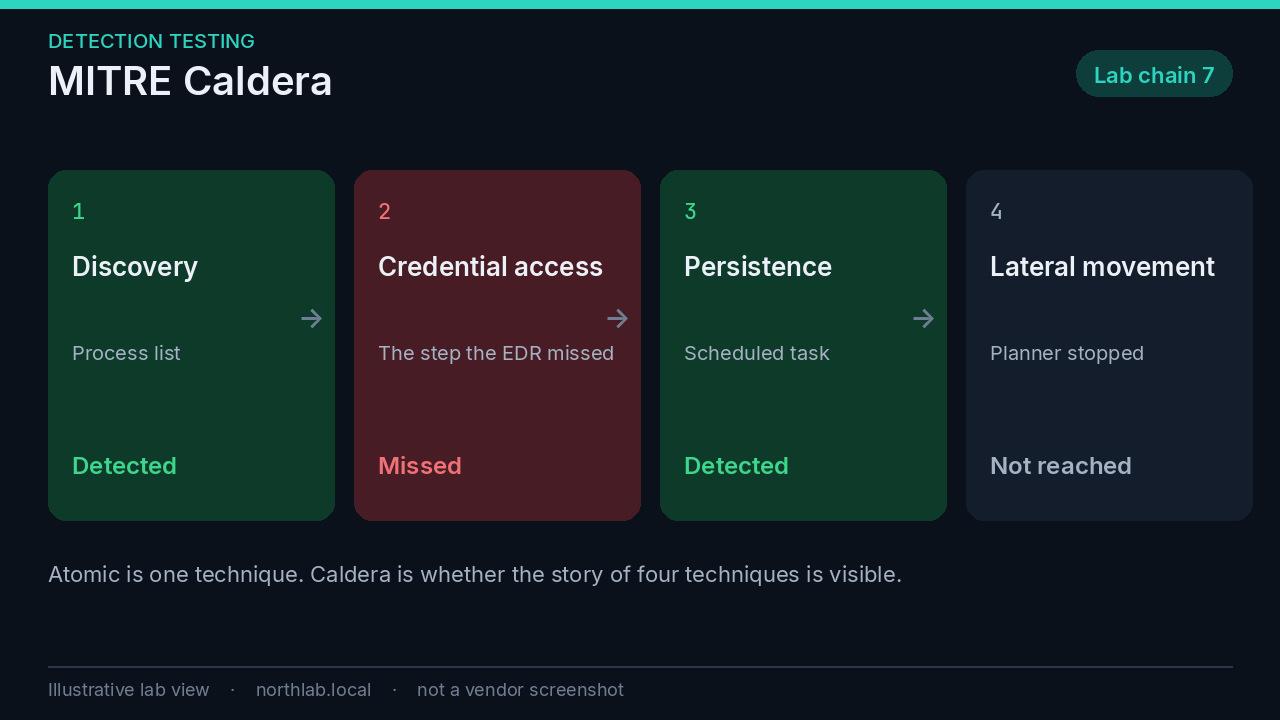
Use Caldera when the question is the chain. Does the EDR see step two, or only step one. Does anyone notice that the same host did discovery, then credential access, then a scheduled task. Single-technique tests will not show you that.
The agent is malware-shaped. Your EDR should complain about the agent itself before the operation starts. If it does not, that is the finding, and you can stop there. Keep this in a lab. An adversary emulator on a production VLAN, with a planner free to try lateral movement, is not a lunchtime experiment.
External attack surface#
Shodan#
Shodan indexes banners. It has already connected to the open ports and recorded what answered. You search your company name, your domains, your netblocks and your certificates. You are looking for Remote Desktop, SMB, old VPNs, management interfaces, cameras, and anything you cannot name an owner for.
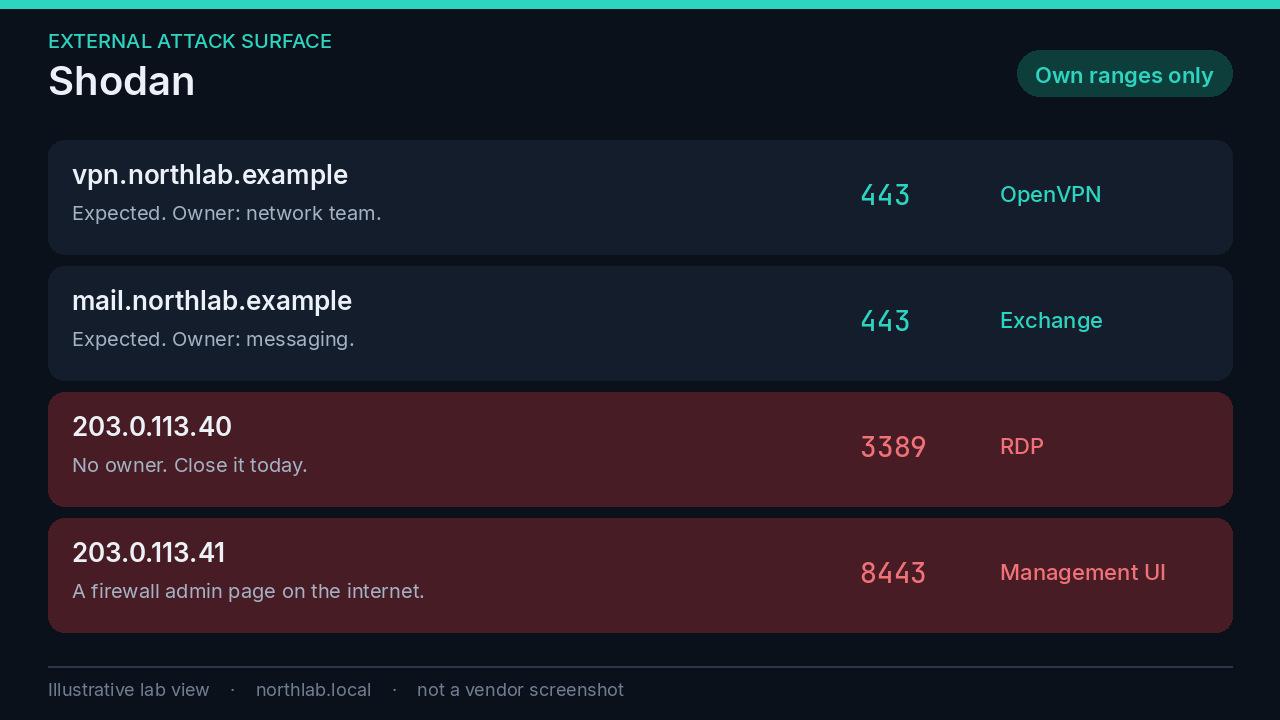
The figure uses 203.0.113.0/24, which is a documentation range, so it cannot be anyone’s real perimeter. The pattern is real. RDP published to the internet is still how a lot of intrusions start, and a firewall’s admin interface on 8443 is the same mistake with a different port. What Shodan shows, anyone else can find. A saved search or a monitor, depending on the plan you have, turns it into a weekly check instead of a one-off scare.
Search your own organisation. Shodan is not a shopping list for other people’s networks.
Persistence, integrity and visibility#
Sysinternals, Mark Russinovich’s suite, is still the fastest way to see what a Windows host is actually doing. Four of them are for the moment you are looking at one machine. Sysmon is the one you deploy everywhere, because the moment you need it is six weeks after the fact.
Autoruns#
Autoruns lists what is set to start. Logon keys, Explorer extensions, services, scheduled tasks, drivers, Winlogon, codecs, Office add-ins, and more. Hide the Microsoft entries. What remains is the list you actually have to read. The VirusTotal column is there for a reason.
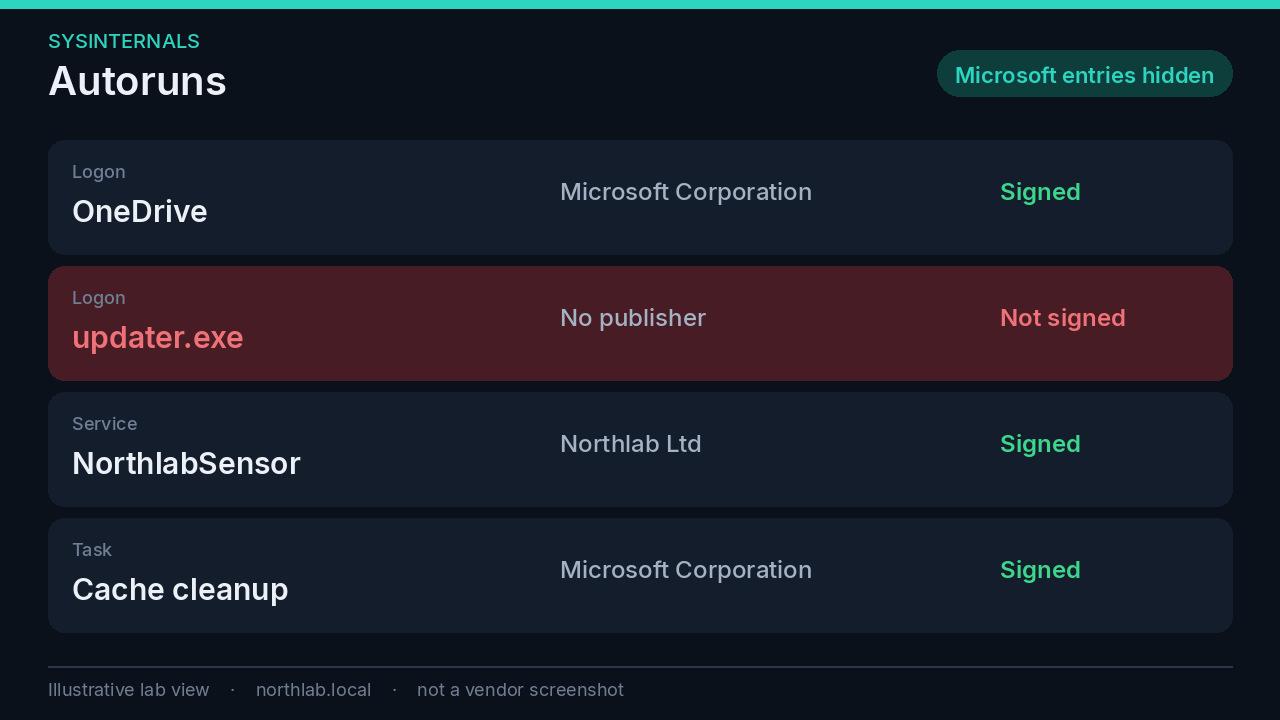
An unsigned executable in a per-user Run key, living under that user’s AppData, is the pattern. It survives reboot, it does not need a service, and it is exactly what a quick compromise leaves behind. Autoruns is also how you check the “remove what you do not use” control: vendor updaters, browser helpers, and the remote-support tool from three suppliers ago.
Sigcheck#
Sigcheck checks the signature, version and certificate on a file or a directory. Autoruns has shown you a binary. Sigcheck tells you who signed it, whether the signature is valid, and optionally what VirusTotal thinks.
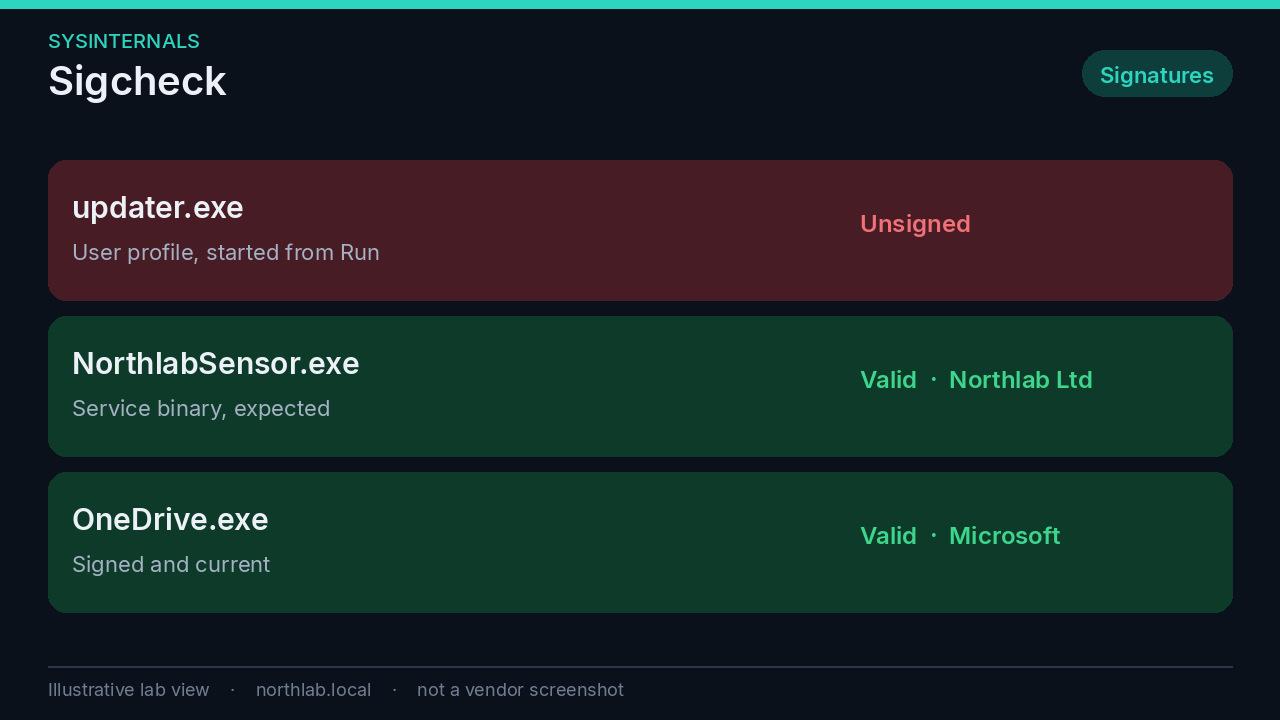
A valid signature is not a verdict of good intent. Signed tools are abused constantly, which is the whole of the grey zone argument. An invalid or missing signature on something that starts at logon is a verdict of “look at this before you do anything else.” Recurse the startup directories when you do not trust that you already know the list.
Process Explorer#
Process Explorer is the process tree with the details Task Manager hides: parent, command line, signature verification, loaded modules, handles, strings. The view that matters is parentage.
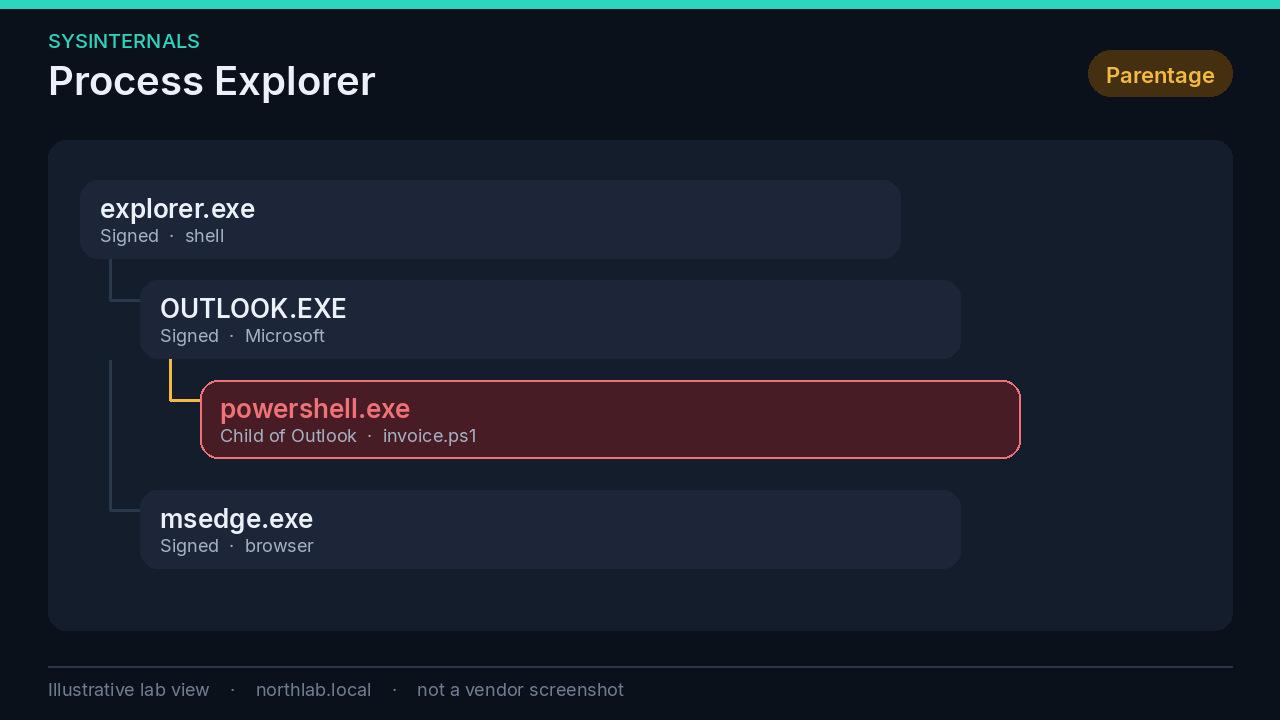
Outlook starting PowerShell is not a Tuesday. A browser starting a script host is the same shape. You can replace Task Manager with Process Explorer if you want to. The reason to open it is the tree, the command line, and the signature, on the one process that does not belong where it is.
TCPView#
TCPView shows live TCP and UDP endpoints and the process that owns them. Refresh it. Unexpected listeners and long-lived outbound connections are the point.
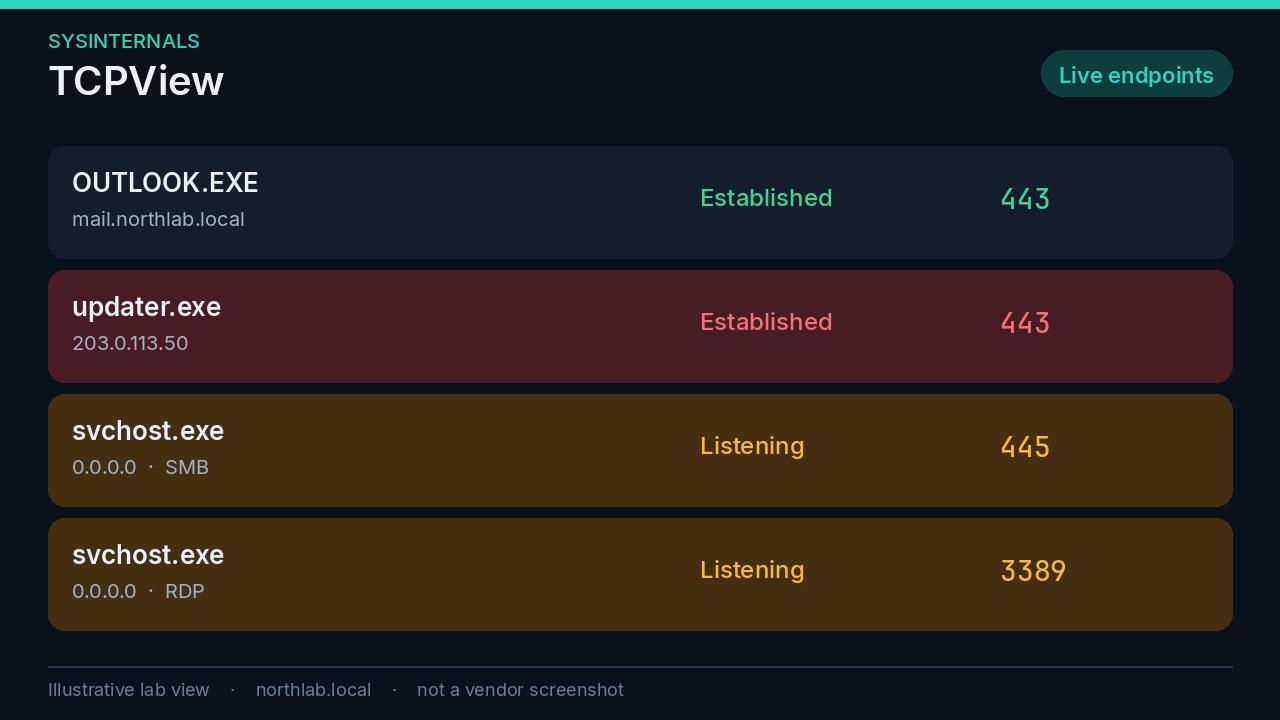
Pair it with the process tree. The unsigned updater that Autoruns found, talking to an address nobody recognises, is a containment decision, not a curiosity. Listening SMB and RDP on a workstation are the hardening items further down, seen from the host rather than from the policy.
Sysmon#
Sysmon is the deployment. It is a service and a driver that writes detailed events to the Windows event log, under Microsoft-Windows-Sysmon/Operational. It does not block anything. It is how you answer “what happened” after the alerts, or in the absence of them.
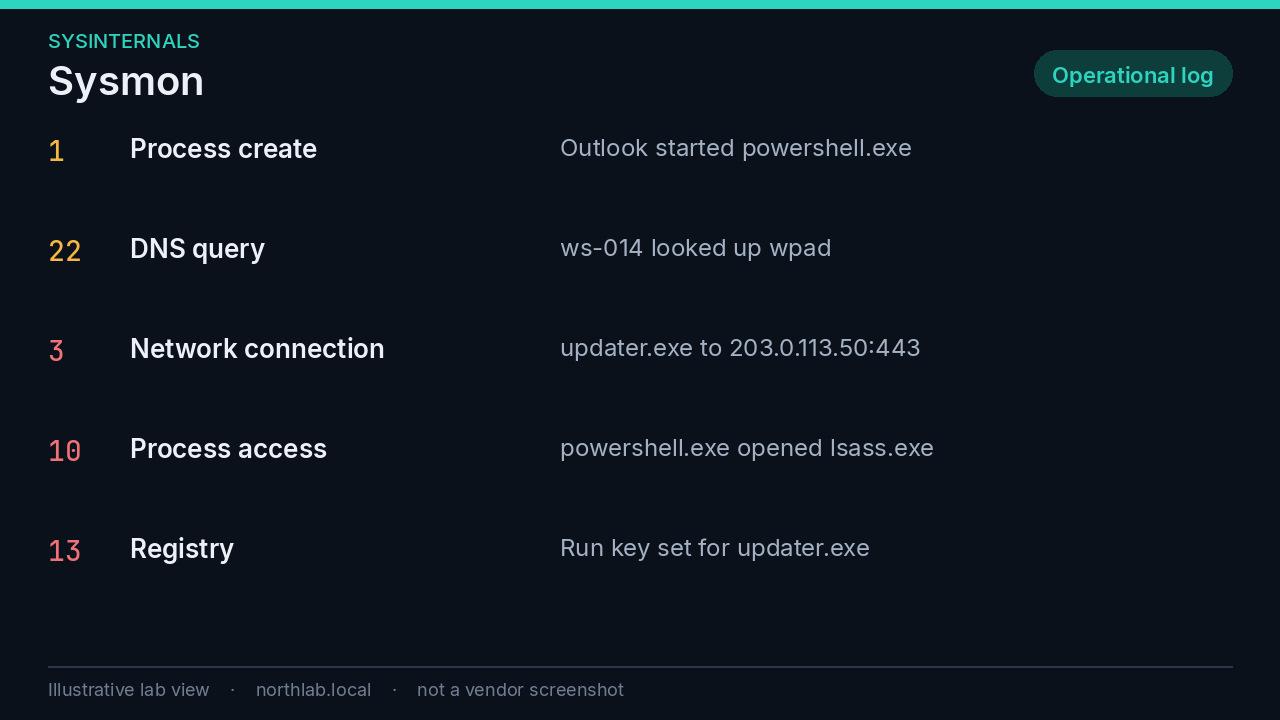
A default install is not a deployment. It is either too quiet or too loud. Start from a maintained configuration and then tune it to your estate. SwiftOnSecurity’s sysmon-config is the usual starting point. Olaf Hartong’s sysmon-modular is the one you trim. Read the config. Do not deploy an XML you have not looked at.
The event IDs worth building detections on:
| Event | What it records |
|---|---|
| 1 | Process creation, with command line and parent. |
| 3 | Network connections. |
| 7 | A module loaded into a process. |
| 10 | A process opening another process. This is how you see LSASS being opened. |
| 11 | File creation. |
| 13 | A registry value being set. |
| 22 | DNS queries. |
Forward the log to the same place as the rest of your telemetry, and keep it. The 90-day retention control later in this post is what makes Sysmon useful in the incident you notice in week six. Sysmon on a laptop, overwritten after a fortnight, is a demo.
Configuration baselines#
A baseline is a written opinion about what a secure build looks like. The tools in this section score a machine, or a policy, against that opinion. A score with no owner is a number. Pick one baseline, audit, write down the exceptions you mean to keep, and apply in rings. Blindly enforcing an entire benchmark on a Friday is how you take out printing, VPN, or a line-of-business application.
| Tool | Compared with | Does it change the machine? |
|---|---|---|
| HardeningKitty | A finding list: CIS, Microsoft, BSI, STIG | Audit mode does not. HailMary mode does. |
| Policy Analyzer | A Microsoft baseline, against a GPO or local policy | It compares. LGPO, in the same toolkit, applies. |
| CIS-CAT Lite | The CIS benchmarks bundled with Lite | It scores and writes an HTML report. |
| Attack Surface Analyzer | A snapshot of the same machine, before and after | It reports the diff. |
HardeningKitty#
HardeningKitty, by Michael Schneider, is a PowerShell module. Audit mode reads the machine against a finding list and scores it from 1 to 6. Passed findings score 4 points, low 2, medium 1, high 0, and the score is that total scaled into the 1 to 6 range. On the professional rating, 5 is good, 4 is sufficient, and 3 or below is insufficient. The lists cover CIS Windows benchmarks, Microsoft security baselines, BSI SiSyPHuS, and DoD STIGs. The script is written for English-language Windows.
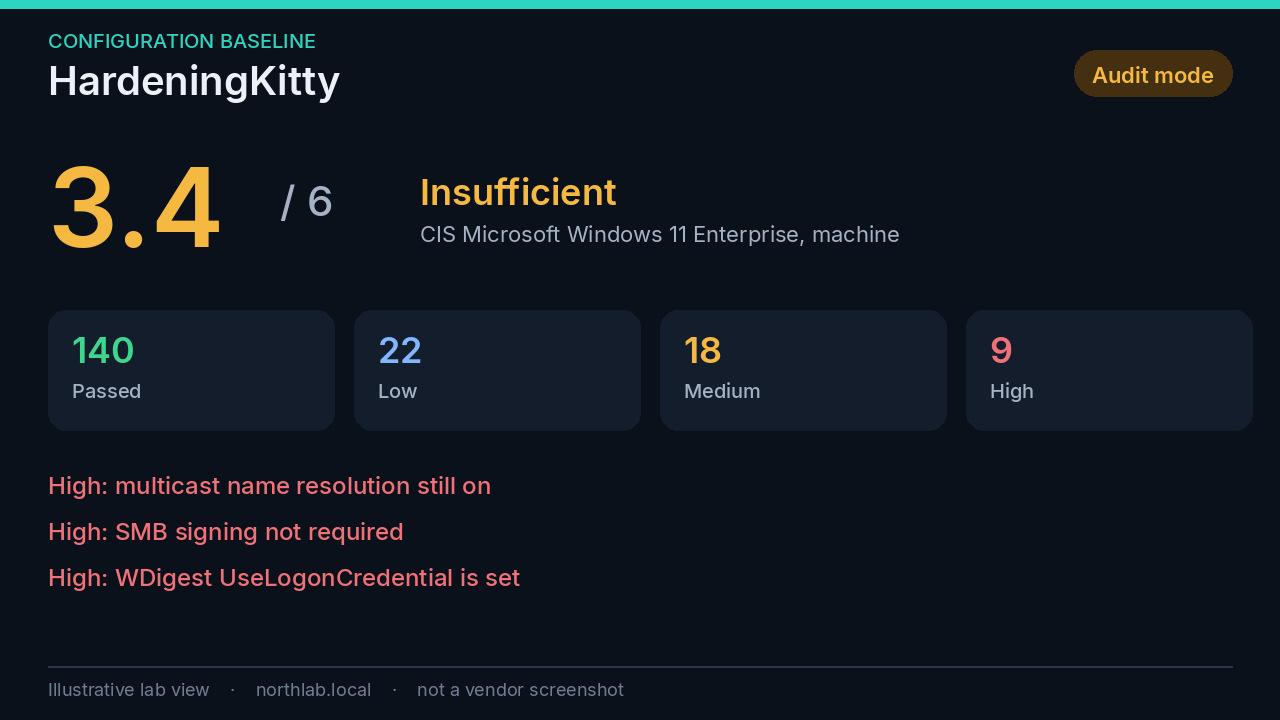
Machine settings need an administrative shell. User settings should be run as the daily user, or you will audit the wrong profile. HailMary mode applies the recommended values. It tries to back up what it changes, and the project is honest that this is not a full restore. Take a real backup or a snapshot before you apply anything, on a pilot, and read every high finding before you decide the baseline is right for that role. A domain controller and a laptop should not get the same unedited list.
Microsoft Security Compliance Toolkit#
The Security Compliance Toolkit is Microsoft’s free download of its own baselines, as Group Policy backups, plus two tools. Policy Analyzer compares a GPO, or the local effective policy, with a baseline and shows the delta. LGPO applies a baseline to a machine that is not domain-joined, which is how you bake one into a golden image or a workgroup server.
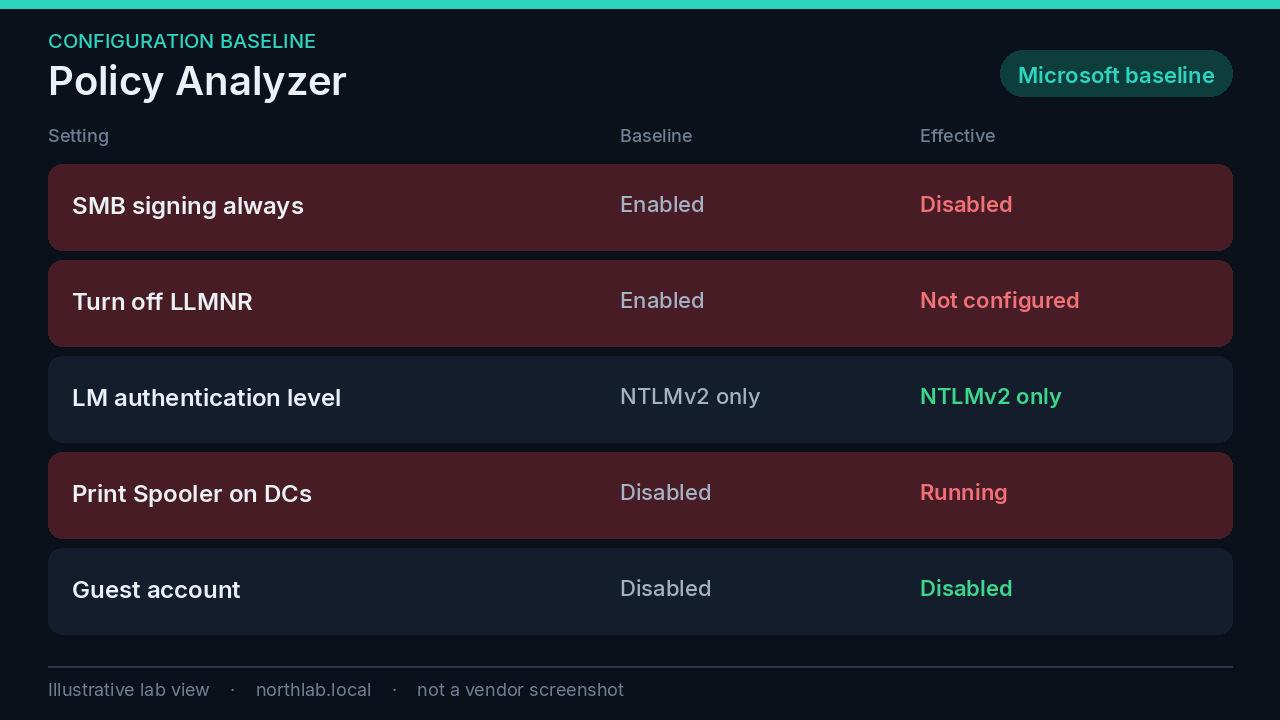
For a domain, import the baseline as a GPO, compare it with what you already enforce, and filter it. Do not link the entire baseline at the domain root and go home. Policy Analyzer is how you check the story you tell yourselves about what Group Policy does. The effective column is the one that counts.
CIS-CAT Lite#
CIS-CAT Lite is the free CIS assessor. It scores a local system out of 100 against the benchmarks bundled with Lite, and writes an HTML report. Lite is a local GUI with a smaller catalogue than CIS-CAT Pro. Pro, which needs a CIS SecureSuite membership, is the remote, multi-platform, full-catalogue tool. The benchmark PDFs themselves are free for non-commercial use, and they are worth reading before you change a setting you do not understand.
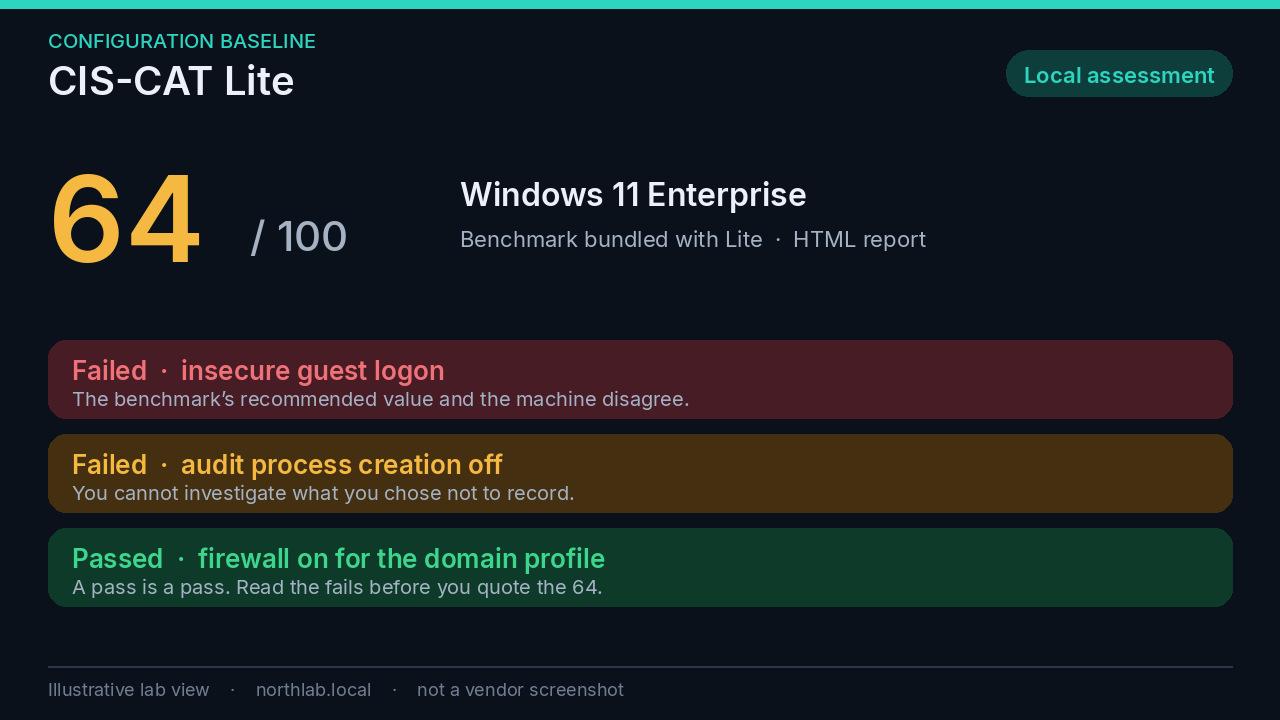
Windows client benchmarks, including Windows 11, are in current Lite. There was a period where automatic benchmark detection on Windows 11 failed because Lite did not yet ship that benchmark. If autodetect errors, turn off gui.auto.detect.benchmark and pick the benchmark yourself. Quote the failed controls, not the headline number.
Microsoft Attack Surface Analyzer#
Attack Surface Analyzer is open source, from Microsoft. You snapshot a clean machine, install the software you are considering, snapshot again, and read the diff. Services, listening ports, firewall rules, certificates, files, registry, scheduled tasks, COM objects.
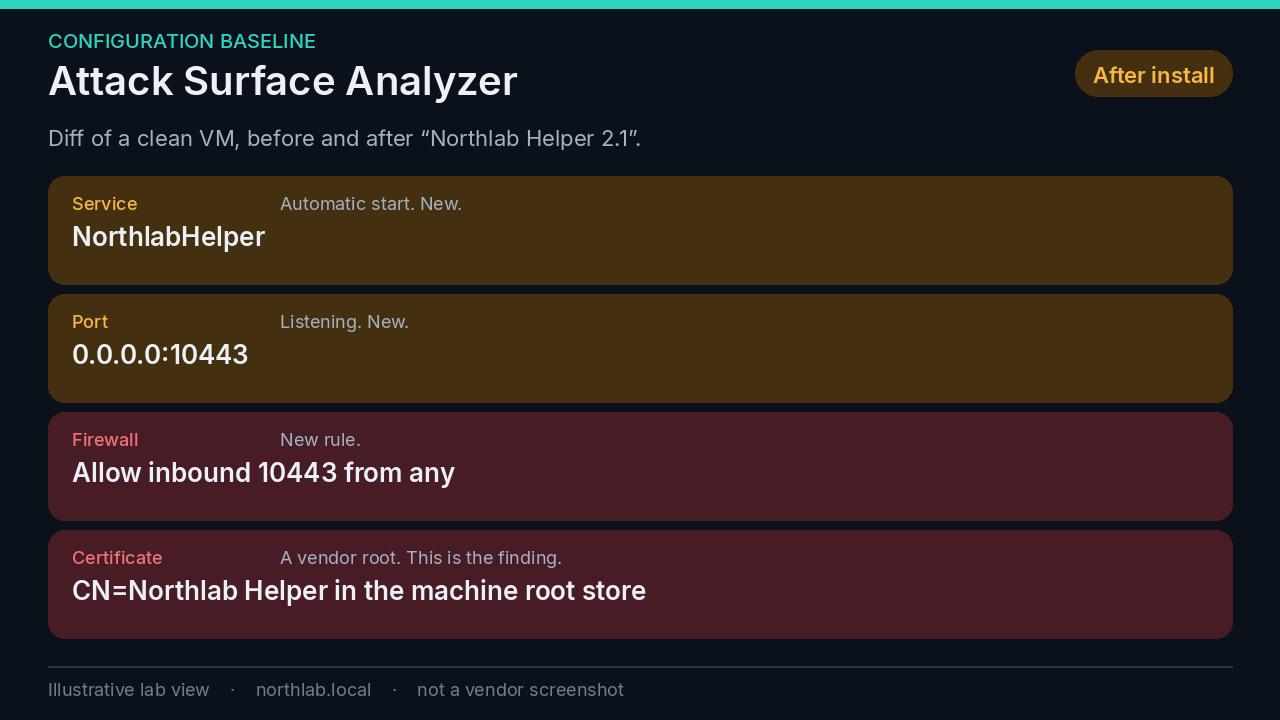
This is how a “lightweight agent” gets into the image, or does not. A new listening port is a conversation. A new firewall rule allowing that port from anywhere is a worse conversation. A vendor certificate landing in the machine’s trusted root store is a reason to stop. Run it on a clean virtual machine, not on your daily laptop, so the diff is the product and not your last week of work.
Hardening every operating system#
The tools above are how you check. These are the controls I want in place so the check comes back quiet. They apply to Windows, Linux and macOS unless a later section narrows them.
Patch quickly. Operating system and third-party software, automatically. Cyber Essentials v3.3 fails the assessment if critical or high-risk updates for operating systems, firmware and applications are not installed within 14 days. I walked through that rule in the Cyber Essentials post. Inside the 14 days, known-exploited vulnerabilities from the CISA catalogue go first. Unsupported software in scope is its own auto-fail. Remove it, or accept that you are out of the scheme and, more importantly, out of fixes.
Least privilege. Nobody uses an admin account for daily work. Separate admin accounts, just-in-time elevation where you can (Privileged Identity Management for Entra roles, a time-boxed local elevation tool on the endpoint), and no standing local admin for users. Cyber Essentials Plus tests the last part. A standard user who can approve their own elevation with a click has admin. The prompt is not a control.
Unique local admin passwords. One password on every workstation is one NTLM hash, and it travels. Windows LAPS is the Windows fix, and I have written the rollout up separately in the LAPS post. The principle is the same on Linux and Mac: no shared root or admin password in a spreadsheet, a build script, or a ticket from 2019.
MFA on all remote and privileged access. Phishing-resistant for admins: passkeys or FIDO2. Cyber Essentials now treats FIDO2 as MFA, and it fails you if a cloud service offers MFA and you have left it off. The patterns for enforcing it are in the Conditional Access post. What still gets through, because someone is tired or a legacy protocol does not support it, is the ITDR post.
Full-disk encryption, with the recovery key escrowed. BitLocker, FileVault, or LUKS. The key lives in Entra, in the MDM, or in a vault with an audit trail. A recovery key in a spreadsheet is a recovery key that leaves with the next person who copies the spreadsheet.
Host firewall on, inbound blocked by default. Open only what that role needs, from the networks that need it. A laptop on a coffee-shop network is its own perimeter. Cyber Essentials assumes this, and so does any ransomware that scans the local subnet for 445.
EDR or anti-malware, with tamper protection, reporting somewhere a person looks. The Atomic section is the test of the last three words. A console nobody opens is a log. Tamper protection matters because the first thing a foothold tries to do is turn the agent off.
Remove what you do not use. Services, software, browser extensions, legacy protocols. Attack Surface Analyzer is how you notice a new install putting them back. Autoruns is how you notice the startup entries that survived the uninstall.
Central logging, kept for 90 days at a minimum. Endpoint, identity, firewall, DNS. Ninety days is a practical floor for an incident that started last month and was noticed today. The NCSC’s logging guidance is the longer version. Sysmon is the Windows endpoint half of this, and it is useless if the log wraps in a fortnight.
Secure Boot and firmware. UEFI Secure Boot on, a firmware password set, firmware updated on the same clock when the update is a security fix. Secure Boot is what makes the BitLocker and Credential Guard story hold. Without a firmware password, a few minutes of physical access can turn Secure Boot off and the rest of the stack is arguing with a boot path you no longer control.
Windows credentials and identity#
Windows will store, cache and replay credentials more helpfully than you want. These settings are the ones that stop a single workstation compromise becoming a domain compromise. Several of them are the highs in the HardeningKitty figure.
Credential Guard. It uses virtualisation-based security to isolate secrets so that dumping LSASS does not hand over the domain credentials that used to be sitting there. It is an Enterprise and Education feature, not Pro. From Windows 11 22H2, and on Windows Server 2025, it turns on by default on eligible hardware when nobody has explicitly switched it off. That default does not apply to a machine where you already disabled it, and it is not a licence you have on Pro. It also breaks single sign-on for MS-CHAPv2, NTLMv1, WDigest and unconstrained delegation. Find those dependencies before you celebrate, and read the known issues before you put it on a domain controller. It does not stop every credential theft. Local accounts and NTLM caught on the wire are still in play. That is why the next items exist.
LSA protection (RunAsPPL). Only signed, trusted code loads into LSASS. It is available on Pro as well as Enterprise. Turn it on. If your build offers an audit mode, use that first: security agents that inject into LSASS will show up, which is a conversation with the vendor, and then you enable enforcement. Leaving it off forever because one agent complained in audit is how the setting dies.
NTLMv1 and LM off. Set LAN Manager authentication level to send NTLMv2 responses only, and refuse LM and NTLM. LM hashes have been off by default for a long time. NTLMv1 still appears where an old appliance forced someone to turn it back on. Audit first. “Network security: Restrict NTLM: Audit incoming NTLM traffic”, and the outgoing equivalent, will tell you who still speaks it. Then restrict. The appliance that needs NTLMv1 is the appliance you replace.
Kerberos, AES only. In “Network security: Configure encryption types allowed for Kerberos”, keep AES and drop RC4. RC4 is the encryption type that makes Kerberoasting cheap: a service ticket can be taken offline and attacked as a password hash. AES is not free to attack, and with a long random password it is not a practical weekend. Find the accounts still requesting RC4 before you flip the domain, or you will lock out an old NAS and a printer.
Prefer group Managed Service Accounts for services. The directory holds a long random password and rotates it. Requesting a ticket for one is still possible. Cracking it is not the path that works. The remaining control is who is allowed to retrieve that password. Keep PrincipalsAllowedToRetrieveManagedPassword short, and review it when people change jobs.
Protected Users, and a tiered admin model. Accounts in Protected Users cannot authenticate with NTLM, cannot use RC4 or DES, cannot be delegated, and are not cached the way a normal account is. Privileged people belong in that group. Service accounts that still depend on NTLM do not. Domain admins do not log on to workstations.
Tier the admin model, the way Microsoft’s privileged access guidance describes it. Tier 0 is identity: domain controllers, Entra Connect, the privilege system. Tier 1 is servers. Tier 2 is the user estate. A tier 0 credential typed into a tier 2 keyboard has left the tier. Privileged access workstations exist so that tier 0 work happens on a machine that does not also browse the web.
WDigest off, and fewer cached logons. UseLogonCredential under the WDigest provider should not be 1. It has been off by default for years. Attackers turn it back on because LSASS will then hold a cleartext password. Sysmon event 13 is how you see the change. Interactive logon cache (cachedlogonscount) is what lets a laptop sign in away from the network. Keep a small number on laptops. Servers that never leave the rack do not need a pile of cached domain credentials.
Windows attack surface#
Turn off LLMNR, NBT-NS and WPAD. This is the Responder problem from the Wireshark section, closed at the source. In Group Policy, enable Turn off multicast name resolution (DNS Client). Disable NetBIOS over TCP/IP on adapters, and push that with DHCP so a new build does not drift. Stop WPAD autodiscovery, and make sure the name wpad does not resolve to a host an attacker can occupy. After the change, the capture should be boring.
SMB. Turn off SMBv1. Require SMB signing. On Windows 11 version 24H2 Enterprise, Pro and Education, signing is already required for inbound and outbound connections. Windows Server 2025 requires it for outbound by default. Home edition is the exception, and older Windows still needs the policy: Microsoft network client: Digitally sign communications (always), and the server equivalent. Signing stops relay. It also stops a NAS that cannot sign, which is a reason to fix or replace the NAS, not a reason to leave the estate relayable. Block inbound SMB on workstations. A workstation does not need to serve files to the subnet.
Disable the Print Spooler where the machine does not print. Especially on domain controllers. The spooler has a history of remote code execution, PrintNightmare and its successors, and a domain controller that is only a domain controller should have the service stopped and disabled. A DC that genuinely has to support printer objects in the directory is a narrower exception, written down, not the default you inherited.
RDP only through a gateway or a VPN. Do not publish 3389. Shodan will find it. Network Level Authentication on. Prefer Remote Credential Guard, which keeps the credential on the client. Restricted Admin also keeps a reusable credential off the target, with the trade-off that a connection in that mode can be opened with a stolen hash. Remote Credential Guard is the better default where the client supports it.
Linux#
SSH is the front door, so the front door is keys, and it is not root.
PasswordAuthentication no
KbdInteractiveAuthentication no
PermitRootLogin no
AllowGroups ssh-users
People log in as themselves and use sudo. AllowUsers or AllowGroups means an account that exists for a daemon cannot SSH. Current OpenSSH on a supported release already prefers modern ciphers and key exchange. Keep the distribution defaults. Re-enabling a legacy cipher for an old client is the change you should have to justify in writing.
Add fail2ban or CrowdSec on the SSH service. fail2ban is local: it reads the log and bans sources that keep failing. CrowdSec does that and can act on a shared view of sources attacking everyone else. Either beats a log nobody reads. Exclude your own admin addresses before you enable it, or you will lock yourself out from a coffee shop and learn nothing about security.
The universal list still applies. Unattended upgrades or the equivalent, a host firewall with inbound denied by default, no shared root password, disk encryption on laptops, and logs shipped off the box. A Linux server with password SSH and a root login is the same shape as RDP on the internet. Shodan indexes it too.
macOS#
Manage every Mac through MDM. Intune or Jamf. Build the profiles from the macOS Security Compliance Project, which turns CIS and NIST baselines into configuration profiles you can deploy. A benchmark PDF that nobody converted into a profile is a wish.
FileVault on, with the recovery key escrowed in the MDM.
Leave SIP, Gatekeeper and XProtect on. Users should not be able to bypass Gatekeeper, whether that is a habit of right-clicking Open, or spctl switched off by someone who wanted one unsigned tool.
Firewall on, stealth mode on. Sharing services off unless a role needs them: screen sharing, remote login, file sharing, AirPlay receiver. Remote Login left on “for the developer” is SSH with a password, which is the previous section.
Standard user accounts. If someone occasionally needs admin, give them a logged, time-boxed elevation tool. Privileges is the usual one. Standing admin on a Mac is the same problem as standing admin on Windows.
A unique local admin password, escrowed. On a Mac enrolled through Intune automated device enrolment, Intune can set a random local admin password and rotate it. It applies at enrolment, so an existing fleet needs a re-enrolment to pick it up. Jamf and other MDMs have their own escrow. The principle matches Windows LAPS. There is a known Intune interaction on macOS versions before 26.4, where a passcode profile can prompt an admin password reset even when you did not ask for one. Rotate afterwards so Intune and the Mac agree, or move the device to 26.4.
Automatic updates, with a deadline, enforced through MDM declarative device management. A prompt the user can defer forever is not a patch policy, and it will not survive the 14-day rule.
Platform SSO with Entra, and passkeys for the privileged roles. The Mac should know who the person is because the directory does, not because a local account happens to share their name.
Lock screen. A short timeout, the password required immediately, automatic login off.
Privacy permissions managed centrally with PPPC profiles: camera, microphone, full disk access, screen recording. A screen-recording grant is a remote-control grant. It belongs on an allow list you review, not on a dialog the user clicks through because an installer told them to.
Network controls that protect hosts#
Host controls fail open when the neighbouring host can still reach them. The network has to agree with the host firewall.
Segment. Separate VLANs for users, servers, management and IoT, with deny-by-default between them. I have written the home-sized version of this, Main, Guest and IoT, including the casting problem, in the UniFi segmentation post. A management VLAN is the same idea with a shorter allow list. Administrators reach infrastructure from there. Infrastructure does not accept administration from the user VLAN. IoT does not browse your file server.
Servers do not get a direct route to the internet unless the role needs one. Updates can go through a proxy or a named allow. DNS for everything goes through resolvers you control, with filtering. That is the DNS hygiene post. An unexpected burst of NXDOMAIN is often the first sign that a host is doing something it should not, and you only see it if the query passed a resolver you log.
Block workstation-to-workstation traffic. SMB, RDP and WinRM (5985 and 5986). Lateral movement needs a path, and the user subnet is the path ransomware uses. Do it on the host firewall and on the VLAN. If one is wrong, the other still holds. Allow those ports only from the management or admin systems that genuinely administer the workstation. A flat LAN where every laptop can reach every other laptop on 445 is one compromised mailbox away from a weekend you will not enjoy.
Where to start#
If I inherited an estate on a Monday and I could not do all of this at once, this is the order.
- Inventory, and the 14-day patch clock. Unsupported software out.
- PingCastle on each domain. Fix the category that sets the score, which is usually privileged accounts.
- BloodHound in a booked window. Close the shortest paths to Domain Admin. Find the privileged sessions on workstations and stop them.
- Unique local admin passwords. LAPS on Windows. The same principle elsewhere.
- The attack-surface switches. LLMNR, NBT-NS, WPAD, SMBv1, SMB signing, the Print Spooler on domain controllers, inbound SMB closed on workstations.
- A baseline audit on a pilot. HardeningKitty or CIS-CAT Lite for the machine, Policy Analyzer for the GPO you think is already doing this.
- An authenticated vulnerability scan of the servers. Greenbone if you can run it. Qualys Community Edition if you want a small external view this week. Nessus Essentials only if this is a lab.
- Shodan against your own ranges. Close what you did not mean to publish.
- Sysmon with a config you have read, forwarded, kept 90 days.
- One Atomic test the EDR claims to detect, on a pilot, with the SOC expecting it. Write down the miss. Fix that before you collect more tools.
Then stop adding tools. The next month is remediation. Another scanner will not close a GenericAll on a helpdesk group, and it will not turn SMB signing on.
References#
Sources for the claims above. Vendor limits and defaults change, so the product pages are the ones to recheck.
Active Directory
- PingCastle and the community edition source and licence
- PingCastle risk scoring
- BloodHound Community Edition and SharpHound collection
Network
Vulnerability scanning
- Greenbone Community Edition documentation
- Nessus FAQ, including the Essentials limits
- Qualys Community Edition and the getting started guide
Web applications and passwords
- Burp Suite Community Edition
- OWASP ZAP
- OWASP Top 10
- sqlmap
- OWASP SQL Injection Prevention Cheat Sheet
- hashcat
- John the Ripper
- Microsoft Entra Password Protection
Detection testing, exposure, and visibility
- Atomic Red Team and Invoke-AtomicRedTeam
- MITRE ATT&CK T1003, OS Credential Dumping
- MITRE Caldera
- Shodan
- Autoruns, Sigcheck, Process Explorer, TCPView, Sysmon
- SwiftOnSecurity sysmon-config and sysmon-modular
Baselines
- HardeningKitty
- Microsoft Security Compliance Toolkit
- Windows security baselines
- CIS-CAT Lite and CIS Benchmarks
- Attack Surface Analyzer
Hardening
- NCSC Cyber Essentials requirements
- CISA Known Exploited Vulnerabilities Catalog
- NCSC logging and protective monitoring
- Credential Guard
- Configure additional LSA protection
- Protected Users
- Group Managed Service Accounts
- SMB signing
- Remote Credential Guard
- Privileged access strategy
- Windows LAPS
- macOS Security Compliance Project
- SAP Privileges
- Intune local admin password for macOS